Slide 2 of 2 from Industry Digital Twin PowerPoint Template
Customizable Industry Digital Twin PPT Slide
Digital Twin Comparison Diagram for Presentations
- Diagram
- Comparison Split
- Concept Explanation Slide
- 16:9
- 100% Editable
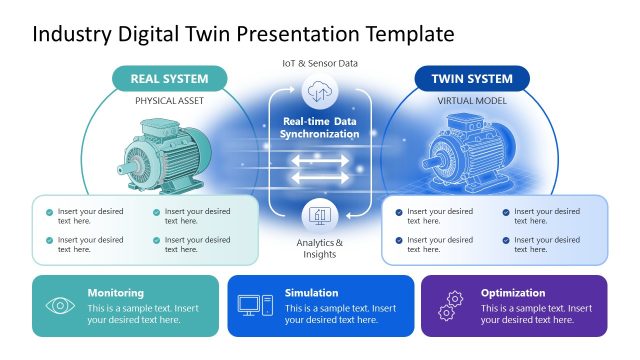
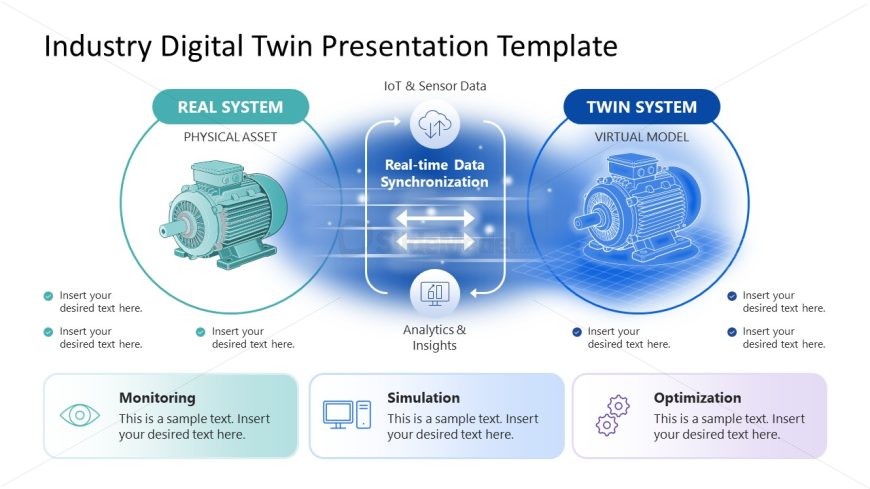
The Digital Twin Comparison Diagram slide from the Industry Digital Twin PowerPoint Template visually contrasts physical and virtual systems, highlighting real-time data synchronization. This slide layout is ideal for business presentations and pitch deck templates focused on technology, enabling clear explanation of monitoring, simulation, and optimization processes using editable shapes and vector icons.
What’s on This Slide
The layout features two main circular sections on the left and right labeled 'Real System' and 'Twin System.' Each section contains an illustration of a motor. In the center, a horizontal arrow indicates 'Real-time Data Synchronization' with connecting arrows pointing in both directions. Below, there are three rectangular boxes labeled 'Monitoring,' 'Simulation,' and 'Optimization,' each with sample text placeholders. The background is a gradient from light blue to white, enhancing the visual hierarchy. Text placeholders are centered within their respective boxes.
How to Use It
This layout serves as a comparison diagram, illustrating the relationship between a physical asset and its virtual model. It is suitable for presentations discussing digital twins in industrial contexts. This slide fits well after an introductory problem slide, providing a clear visual representation of the concepts. It can be used to explain processes such as data synchronization and system monitoring, making it useful for technology and engineering discussions.
Text Placeholders & Capacity
Keep your copy within these limits so it fits without resizing. Body slots can hold about 8-10 words each.
| Placeholder | Count | Max characters (approx.) |
|---|---|---|
| Slide title | 1 | 50 |
| Item heading | 2 | 20 |
| Item body | 6 | 40 |
| Chart title | 1 | 50 |
Slide Keywords
Download unlimited PowerPoint templates, charts and graphics for your presentations with our annual plan.
DOWNLOADReturn to Industry Digital Twin PowerPoint Template.