The Goal Setting Metrics Objectives PowerPoint Template is an editable goal planning slide for business planning and project management purposes. Goals are the fundamental targets set according to the company’s strategic vision that drives action plans throughout the process. To practically implement these goals, the measurable objectives are laid down in a precise and measurable way. The variables that are used to measure these goals are called goal metrics or KPIs. For every business or project handling, it is vital to establish a clear picture of goals, objectives, and metrics. This goal-setting PowerPoint template is created for our users to prepare an easy-to-interpret objective slide to present before the team and stakeholders.
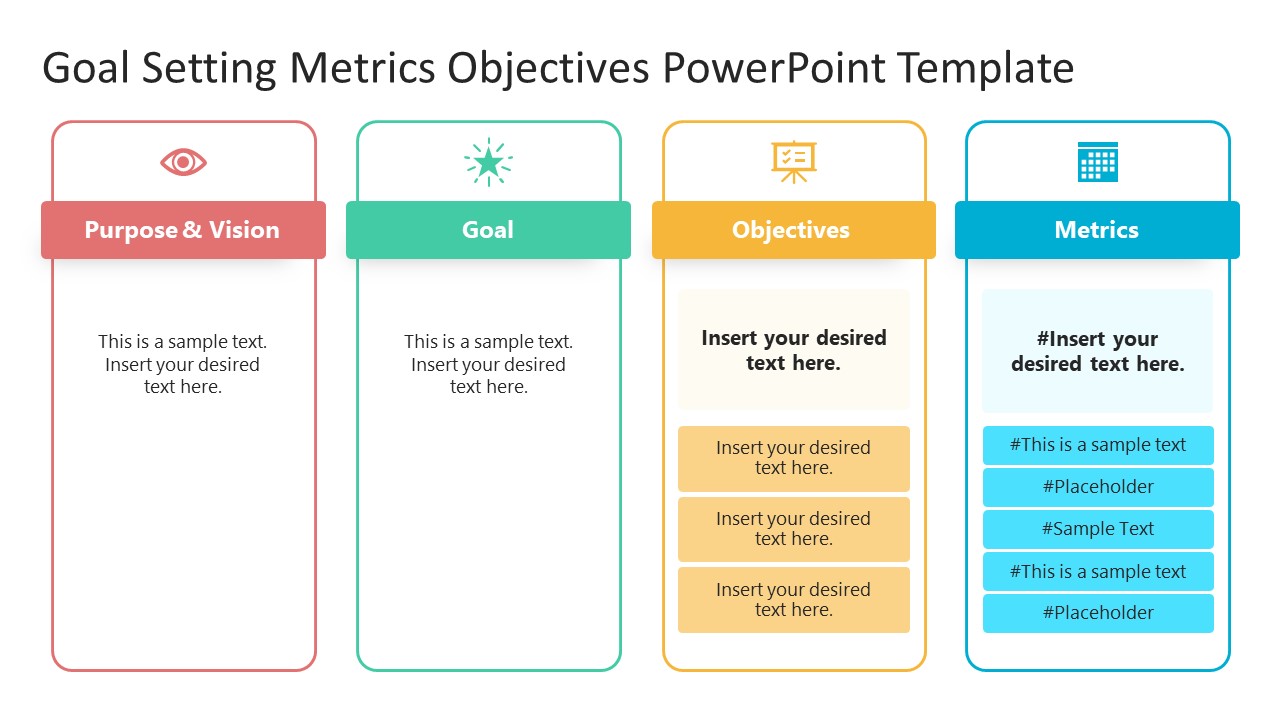
Presenters can fully customize this goal setting PowerPoint template slide that shows four equal-size columns carrying meaningful infographic icons and a title bar. The first two vertical sections represent the vision & purpose and the goal statement. Users can edit the text areas to mention the vision and goals according to their presentation. The following are the objectives and metrics sections with sub-divisions to accommodate several objectives or metrics. The hash symbol is placed before the placeholder text in the metrics section that indicates the measurable nature of the mentioned factors.
Users can edit each field of the slides and make it ready for presentation in just a few clicks. The applications of our Goal Setting Metrics Objectives PowerPoint Template are not limited to business or project management. Users from education, science & research, or other fields can also customize this goal-setting template in their presentations. All the design features of this objective slide are equally functional with Google Slides and Keynote. The slide template is provided in two background color variations. Presenters can also make necessary changes to the color scheme, graphical icons, and font styles to fit this template to their presentation design. Alternatively, check our collection of Goal templates for PowerPoint.
What’s inside this template
Example presentation scenarios
- A project manager can use the four-column diagram in a kickoff meeting to connect the project purpose, goal statement, specific objectives, and measurable metrics before work begins.
- A strategy leader can present the Purpose & Vision and Goal columns during a planning workshop, then ask the team to refine the Objectives cards and Metrics rows together.
- An operations manager can use the Metrics column to explain how success will be tracked, while the Objectives column shows the workstreams or targets tied to those measures.
- An educator or research lead can adapt the columns to define a program purpose, learning or research goal, objectives, and measurable indicators for a proposal or review.
Features
- 100% editable presentation template
- Compatible with Microsoft PowerPoint and Google Slides
- 16:9 aspect ratio slides
- Scalable vector shapes, icons and illustrations
- AI-Ready for Microsoft Copilot and Claude
- Instant access and download
Frequently asked questions
Q: How should I present the difference between purpose, goals, objectives, and metrics with this template?
A: Present the slide from left to right. Start with Purpose & Vision to explain why the work matters, then state the single goal as the main target. Use the Objectives cards for concrete actions or outcomes, and finish with the Metrics rows to show how progress will be judged.
Q: Who is this goal setting layout best suited for?
A: This layout fits presenters who need a shared planning view rather than a detailed report. Project managers, team leaders, strategy facilitators, educators, and research coordinators can use it to align stakeholders around intent, target, actions, and measurements before assigning responsibilities or tracking progress.
Q: Why does the four-column structure help communicate a goal plan?
A: The columns create a simple cause-to-measure logic: purpose leads to a goal, the goal breaks into objectives, and objectives are checked with metrics. The icon headers and color-coded ribbons help the audience separate each concept, while the stacked cards show that objectives and metrics can contain several items.


Goal Setting Metrics Objectives PowerPoint Template
2-slide presentation template for goal setting with purpose, objectives, and metrics columns
This 2-slide diagram template presents a goal setting framework with four vertical columns for Purpose & Vision, Goal, Objectives, and Metrics. It includes light and dark background versions, editable icon headers, objective cards, and metric rows for business planners, project managers, educators, and teams working in Microsoft PowerPoint or Google Slides.
- Category
- Diagrams
- Rating

 Loading...
- Aspect ratio
- 16:9
- Item ID
- 21540-01
- Colors
 Microsoft PowerPoint
 Microsoft Copilot
 Claude for PowerPoint
Other formats supported
Subscribe today and get immediate
access to download our PowerPoint templates.