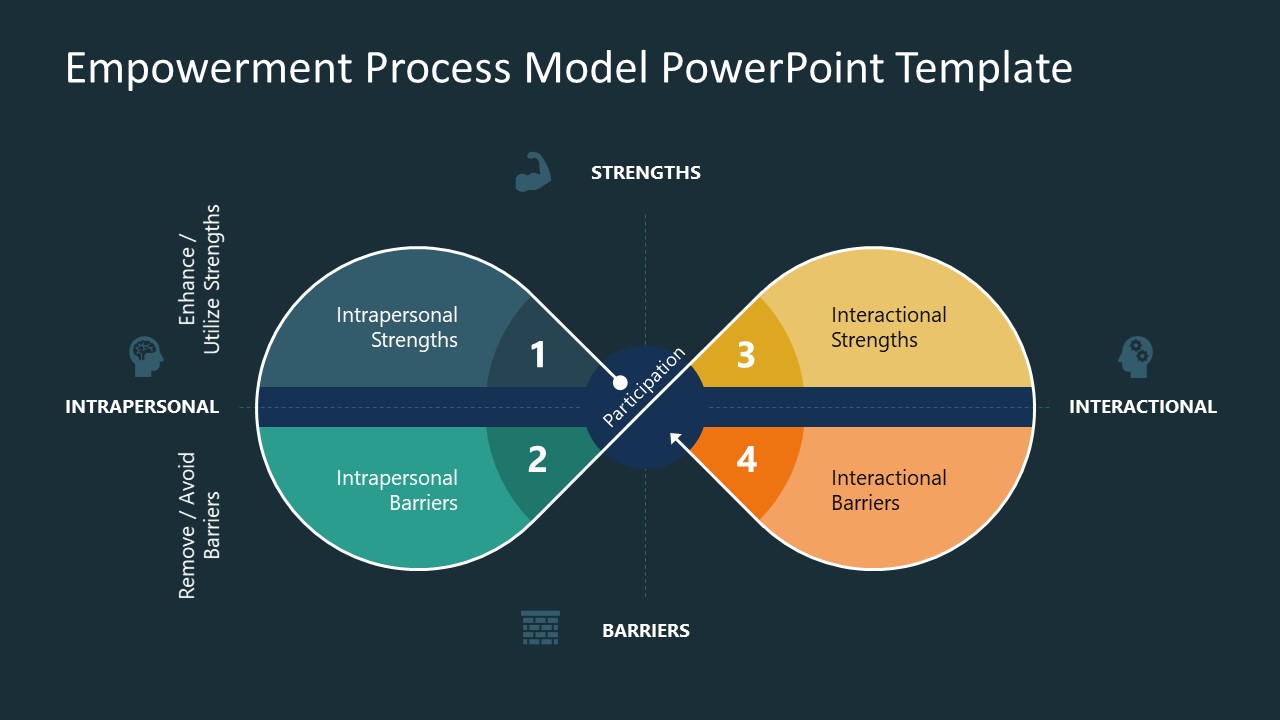
The Empowerment Process Model PowerPoint Template features an engaging two-lobed diagram for presenting the components of the empowerment process model. This empowerment triangle is designed to showcase the key improvement areas for the empowerment of the people, such as employees at an organization, students, or team members. This diagram template can be used in discussions and meetings to make strategies for workforce empowerment. Professionals can thoroughly edit the diagram with all PowerPoint versions and Google Slides. Likewise, the background settings can be changed according to the presentation requirements,
Our Empowerment Process Model PowerPoint Template shows a two-lobed diagram divided into four quadrants. Each quadrant displays the characteristics that must be observed for empowering social interaction and responsibilities. For instance, the left-side quadrants showcase intrapersonal features like enhancing strengths and avoiding barriers. In contrast, the quadrants on the other side indicate interactional qualities such as interactional strengths and barriers. The node between the two lobes of this diagram represents participation. Conceptually, this figure promotes the idea that lowering the barriers in intrapersonal or interactional abilities and enhancing the abilities in both respects can lead to a team or group with empowered standing in their roles.
We have added distinct colors in multiple segments of the diagram. This PPT template also carries the dark background version of the slides. So, professionals can choose from either slide design and use them according to their use cases. Likewise, presenters can mention the relevant description points by adding text boxes and other design features to enhance the presentation template. The slide also contains meaningful infographic icons for visual interaction with the attendees. Grab this editable presentation template and try editing it now!
What’s inside this template
Example presentation scenarios
- An HR leader can use the four-quadrant empowerment diagram to explain how employee strengths and barriers influence participation in a culture or engagement workshop.
- A training facilitator can use the numbered lobe segments to guide learners through intrapersonal strengths, intrapersonal barriers, interactional strengths, and interactional barriers in a structured lesson.
- An organizational development consultant can use the light and dark diagram options to compare current empowerment obstacles with desired interaction behaviors during a client strategy session.
- An educator or program manager can use the intrapersonal and interactional axes to discuss student agency, group participation, and social barriers in a development program.
Features
- 100% editable presentation template
- Compatible with Microsoft PowerPoint and Google Slides
- 16:9 aspect ratio slides
- Scalable vector shapes, icons and illustrations
- AI-Ready for Microsoft Copilot and Claude
- Instant access and download
Frequently asked questions
Q: How should a presenter explain the empowerment model without making the diagram feel abstract?
A: Start with the horizontal contrast between intrapersonal and interactional factors, then move vertically from strengths to barriers. Use the numbered quadrants as the speaking order, and bring the discussion back to the central participation connector. This keeps the model practical: what people can build, what blocks them, and how participation changes.
Q: Who is this template best suited for in a business or learning setting?
A: This template fits presenters who need to frame empowerment as a development issue rather than a simple motivation topic. HR managers, team leaders, coaches, educators, and organizational development consultants can use the four quadrants to discuss behavior, collaboration, barriers, and responsibility with employees, students, or group participants.
Q: Why does the two-lobed quadrant design help explain empowerment?
A: The two-lobed shape acts as a metaphor for two connected domains: the individual side and the interaction side. The central participation node shows that empowerment depends on both. By placing strengths above and barriers below, the layout makes improvement areas easy to compare without turning the explanation into a long text list.




Empowerment Process Model PowerPoint Template
4-slide presentation template for empowerment process quadrants, strengths, and barriers
The Empowerment Process Model PowerPoint Template is a 4-slide diagram template for explaining empowerment through strengths, barriers, participation, and intrapersonal versus interactional dimensions. It includes light and dark versions of a two-lobed quadrant model with icons, labels, and numbered segments for PowerPoint and Google Slides.
- Category
- Models
- Rating

 Loading...
- Aspect ratio
- 16:9
- Item ID
- 21862-01
- Colors
 Microsoft PowerPoint
 Microsoft Copilot
 Claude for PowerPoint
Other formats supported
Subscribe today and get immediate
access to download our PowerPoint templates.