Slide 5 of 5 from Customer Experience Diagram PowerPoint Template
Marketing Customer Experience PPT
Customer Experience Diagram for PowerPoint
- Diagram
- Process Flow
- Process Slide
- 16:9
- 100% Editable
What’s on This Slide
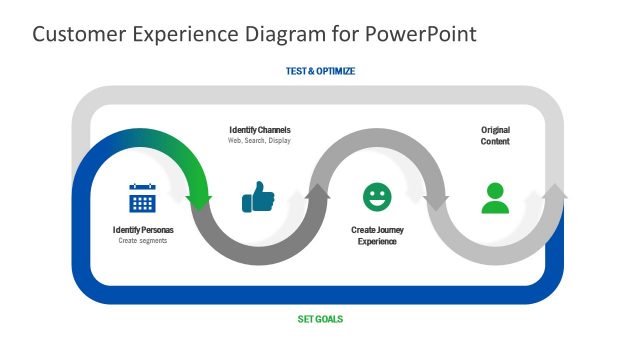
The layout features a curved pathway divided into three segments, each containing labeled nodes. The leftmost node contains an icon of a calendar with the label 'Identify Personas' and a sub-label 'Create segments.' The middle node displays a thumbs-up icon labeled 'Identify Channels' with a sub-label 'Web, Search, Display.' The right node shows a smiley face icon labeled 'Create Journey/Experience.' An upward arrow leads to a node labeled 'Original Content.' The background is dark blue, enhancing the visual hierarchy of the elements.
How to Use It
This layout serves as a process flow diagram illustrating the customer experience journey. It fits well in a presentation discussing customer engagement strategies, mapping out steps for optimizing customer interactions. This structure is useful for businesses aiming to visualize customer journey stages, identify touchpoints, and set goals for improvement. It can be employed in workshops or strategy sessions focused on enhancing customer satisfaction and experience.
Text Placeholders & Capacity
Keep your copy within these limits so it fits without resizing. Node labels can accommodate roughly 30 characters each.
| Placeholder | Count | Max characters (approx.) |
|---|---|---|
| Item heading | 3 | 30 |
| Item body | 3 | 30 |
| Slide title | 1 | 50 |
Slide Keywords
Download unlimited PowerPoint templates, charts and graphics for your presentations with our annual plan.
DOWNLOAD