Slide 2 of 2 from Circular Feedback Grid Diagram PowerPoint Template
Editable Circular Feedback Grid Diagram PPT Slide
Circular Feedback Grid Diagram for Presentations
- Diagram
- Matrix Quadrant
- Strategic Analysis Slide
- 16:9
- 100% Editable
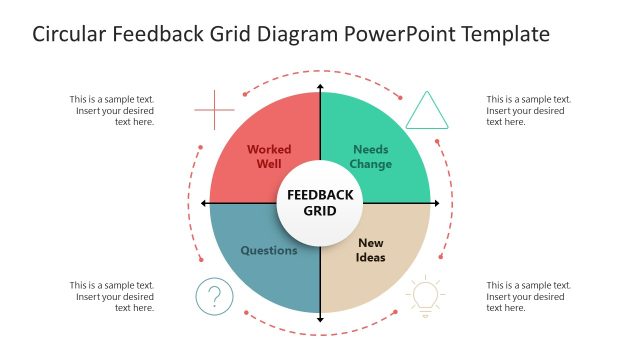
The Circular Feedback Grid slide from the Circular Feedback Grid Diagram PowerPoint Template offers a strategic analysis layout ideal for business presentations and project evaluations. This editable slide features a visually balanced circular diagram segmented into four categories to facilitate feedback analysis and team discussions. Designed with vector icons and customizable shapes, it enhances clarity in corporate presentations and pitch decks, making it a practical choice among Google Slides templates and PowerPoint templates for effective communication.
What’s on This Slide
The layout features a circular diagram divided into four equal segments, each labeled with distinct categories: 'Worked Well,' 'Needs Change,' 'New Ideas,' and 'Questions.' The central area contains the label 'FEEDBACK GRID.' Each segment has a unique background color, with icons positioned near the segment labels. Text placeholders are located at the top and bottom, aligned centrally, allowing for additional context. The overall design uses a dark background, enhancing the visibility of the colorful segments and icons, creating a balanced visual hierarchy.
How to Use It
This layout serves as a feedback analysis tool, ideal for summarizing insights from team discussions or project evaluations. It fits well in a presentation sequence after problem identification, guiding the audience toward actionable insights. This structure is suitable for business meetings, educational settings, or project reviews where feedback is essential. It can be used individually to facilitate brainstorming sessions or group discussions focused on improvement areas.
Text Placeholders & Capacity
Keep your copy within these limits so it fits without resizing. Node labels can hold about 20 characters each, body slots are tight, roughly 10-15 words each.
| Placeholder | Count | Max characters (approx.) |
|---|---|---|
| Slide title | 1 | 30 |
| Item heading | 4 | 20 |
| Body paragraph | 4 | 50 |
Slide Keywords
Download unlimited PowerPoint templates, charts and graphics for your presentations with our annual plan.
DOWNLOADReturn to Circular Feedback Grid Diagram PowerPoint Template.