Download our Animated Spin the Wheel PowerPoint Template for your webinars, live sessions, and educational or recreational presentations. This PPT template provides a fully functional spinning wheel animated diagram that spins 360 degrees with the clicks of the play & pause buttons. Users from all fields can use this creative template for gaming, activities, quizzes, lucky draws, business predictions, etc. This spin the wheel template is decorated with an attractive color scheme and lighting effects to enhance the audience’s engagement. Presenters can change the values in each wheel segment according to the requirements. For instance, the winner prizes can be entered in the sections in a live lucky-win game.
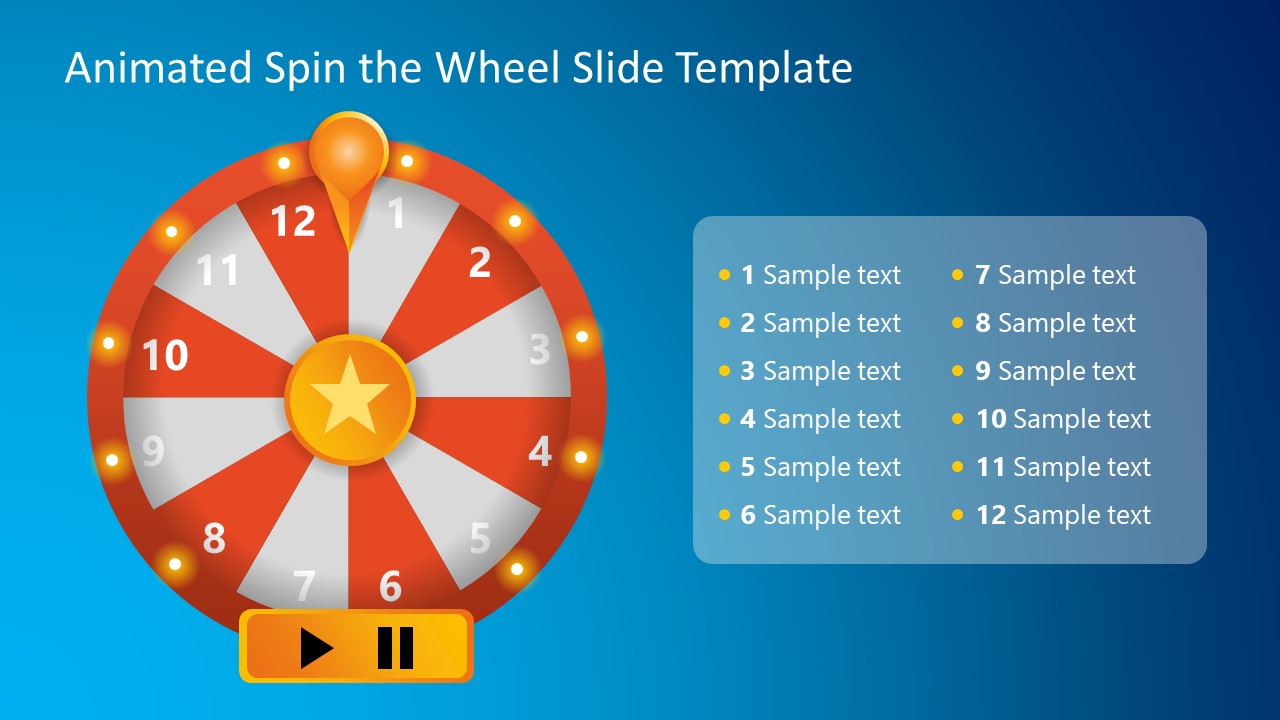
The Animated Spin the Wheel PowerPoint Template is a one-pager slide template. The background of the slide has a blue color gradient scheme. The colors of the wheel are chosen bright red, which looks appealing against the background. The diagram is a circle divided into 12 sections along the diameter lines. These wheel segments have an alternative color pattern or white & red. On the boundary of the circle, small circles in yellow color are added, which imitate the lights on a real-life spinning wheel. Likewise, an orange pointer and central star shape are also created using PowerPoint shapes.
Below the template diagram, two buttons for play and pause are displayed. When the play button is clicked, the wheel spins, and the motion of the pointer is well-coordinated. On pressing the pause button, the motion stops. So, presenters can use these buttons randomly, like in an actual spinning wheel. An editable text chart is provided on the slide to mention values for each wheel section. Users can edit and personalize the template. The spin the wheel can be edited using all PowerPoint versions. Download and try it now!
What’s inside this template
Example presentation scenarios
- A webinar host can use the 12-segment wheel to select a giveaway winner and show the prize options in the two-column list.
- A teacher can use the numbered wheel to choose quiz prompts, student turns, or review topics during a classroom activity.
- A corporate trainer can use the play and pause controls to assign breakout tasks or discussion prompts during an interactive workshop.
- An event presenter can use the wheel, pointer, and visible outcome list to run a lucky draw in front of an audience.
Features
- 100% editable presentation template
- Compatible with Microsoft PowerPoint
- 16:9 aspect ratio slides
- Scalable vector shapes, icons and illustrations
- Ready with Animations & Transitions in PowerPoint
- AI-Ready for Microsoft Copilot and Claude
- Instant access and download
Frequently asked questions
Q: How should a presenter structure an activity around this spin wheel?
A: Frame the wheel before pressing play so the audience understands what each numbered segment represents. Keep the two-column list short, specific, and easy to scan. After the wheel stops, pause briefly, call out the selected number, then connect the result to the next question, prize, task, or discussion prompt.
Q: Who is this template best suited for?
A: This template fits presenters who need a short live interaction rather than a full instructional deck. Webinar hosts, teachers, trainers, and event facilitators can use it to select winners, questions, teams, or topics. The wheel makes random choice visible, which helps audiences follow the selection process.
Q: Why does the wheel metaphor work for audience interaction?
A: A spin wheel creates suspense because the audience can see all possible outcomes and watch the pointer move toward one result. The circular layout, numbered segments, lights, and play button borrow from game-show cues. That makes the activity feel structured, fair, and easy to understand without extra explanation.

Animated Spin the Wheel PowerPoint Template
1-slide animated PowerPoint presentation template with spin wheel diagram and editable prize list
The Animated Spin the Wheel PowerPoint Template is a 1-slide interactive diagram for Microsoft PowerPoint. It shows a 12-segment spinning wheel, play and pause controls, an orange pointer, and a two-column editable item list. It is suited for presenters running quizzes, lucky draws, classroom activities, webinars, or live audience sessions.
- Category
- Diagrams
- Rating


 Loading...
- Aspect ratio
- 16:9
- Item ID
- 65032-01
- Colors
 Microsoft PowerPoint
 Microsoft Copilot
 Claude for PowerPoint
Other formats supported
Subscribe today and get immediate
access to download our PowerPoint templates.