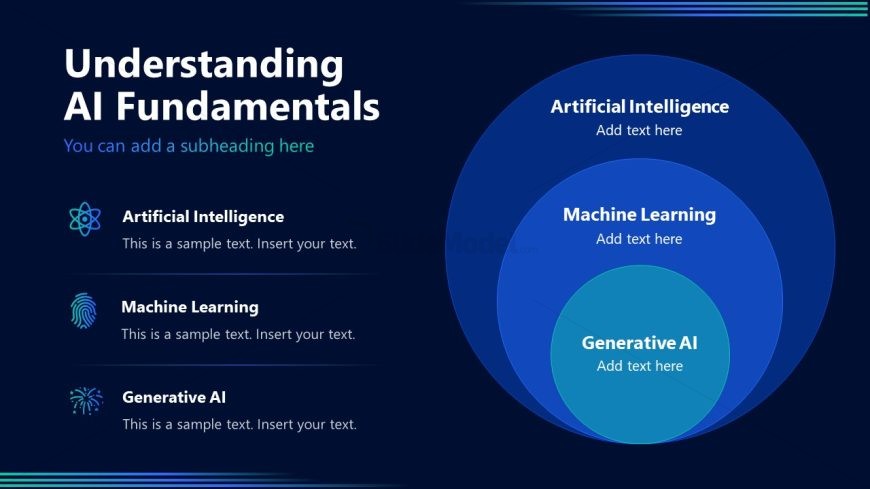
Slide 4 of 10 from AI Training PowerPoint Template
Concentric Circles for Gen AI ML & AI – AI Training Template PPT Layout
Understanding AI Fundamentals Slide
- Diagram
- Venn
- Concept Explanation Slide
- 16:9
- 100% Editable
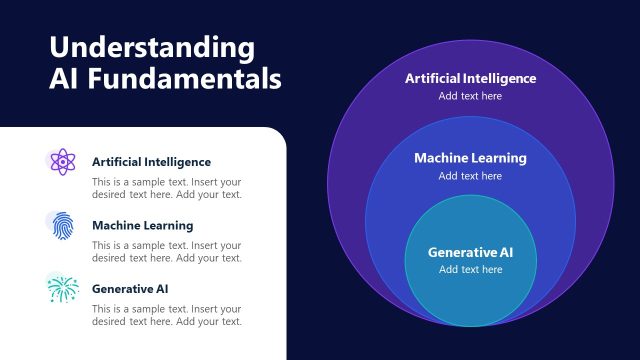
The Understanding AI Fundamentals slide from the AI Training PowerPoint Template offers a clear Venn diagram layout ideal for educational presentations and workshops. This slide template uses editable shapes and vector icons to visually explain the relationships between Artificial Intelligence, Machine Learning, and Generative AI, making it a practical choice for business presentations or corporate training sessions focused on AI concepts.
What’s on This Slide
The slide features a dark blue background with a large title at the top left, stating 'Understanding AI Fundamentals.' Below the title, there is a subtitle placeholder for additional context. To the left, three sections are vertically aligned, each containing a title and a text placeholder. The first section is labeled 'Artificial Intelligence,' the second 'Machine Learning,' and the third 'Generative AI.' Each section has a corresponding icon: a brain symbol, a fingerprint, and a sparkler, respectively. To the right, a Venn diagram illustrates the relationship among the three concepts, with the largest circle representing 'Artificial Intelligence,' the middle circle for 'Machine Learning,' and the smallest for 'Generative AI.'
How to Use It
This layout serves as an explanatory diagram for AI concepts, ideal for educational or training sessions. It fits well after introductory slides on AI, providing a clear visual representation of the relationships between Artificial Intelligence, Machine Learning, and Generative AI. This structure is useful in corporate training, workshops, or presentations aimed at demystifying AI for audiences unfamiliar with the subject. It can also be employed in discussions about the evolution of AI technologies and their implications in various sectors.
Text Placeholders & Capacity
Keep your copy within these limits so it fits without resizing. Node body slots are tight, roughly 10 words each.
| Placeholder | Count | Max characters (approx.) |
|---|---|---|
| Slide title | 1 | 40 |
| Subtitle | 1 | 50 |
| Item heading | 3 | 30 |
| Item body | 3 | 50 |
| Chart title | 1 | 40 |
Slide Keywords
Download unlimited PowerPoint templates, charts and graphics for your presentations with our annual plan.
DOWNLOADReturn to AI Training PowerPoint Template.