Slide 1 of 2 from Agile Process Lifecycle Diagram for PowerPoint
Agile Methodology PPT Lifecycle Diagram
Agile Lifecycle Diagram for PowerPoint
- Diagram
- Circular Cycle
- Process Slide
- 16:9
- 100% Editable
What’s on This Slide
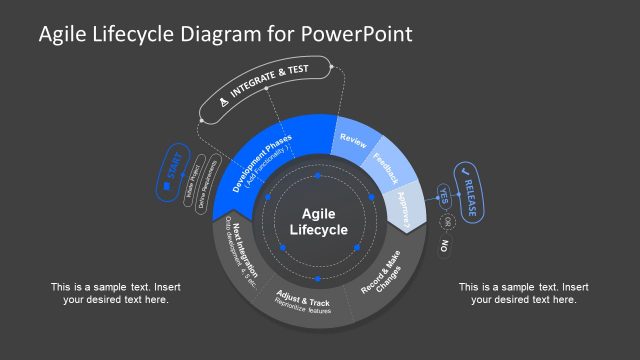
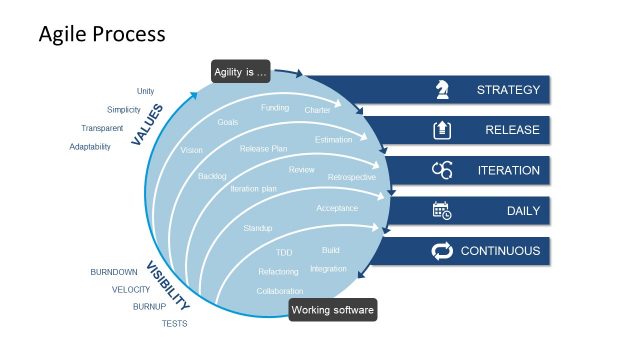
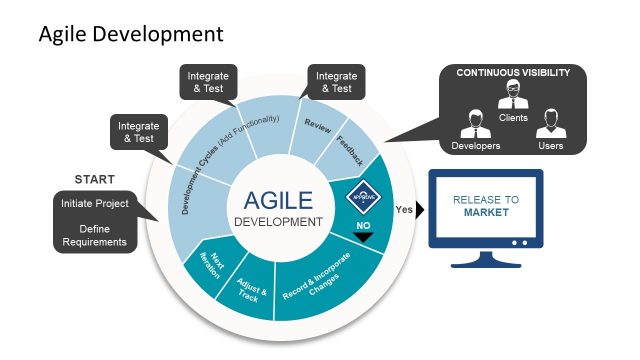
The slide features a circular diagram divided into segments representing the Agile lifecycle. At the center is the label 'Agile Lifecycle.' Surrounding this are labeled segments including 'Start,' 'Development Phases,' 'Review,' 'Feedback,' and 'Integrate & Test.' Arrows indicate flow direction, with decision points labeled 'Yes' and 'No' leading to 'Release.' Text placeholders are positioned at the bottom and sides for additional information. The color scheme includes blue and gray tones, with a clear visual hierarchy emphasizing the lifecycle stages.
How to Use It
This layout serves as a process diagram illustrating the Agile lifecycle, suitable for presentations on software development methodologies. It fits well after problem framing slides, providing a visual representation of stages in Agile development. This diagram can be used in contexts such as project planning, team training, or stakeholder presentations to explain Agile processes clearly. It is ideal for showcasing iterative development and feedback loops in software projects.
Text Placeholders & Capacity
Keep your copy within these limits so it fits without resizing. Node labels can accommodate about 20 characters each.
| Placeholder | Count | Max characters (approx.) |
|---|---|---|
| Slide title | 1 | 30 |
| Item heading | 6 | 20 |
| Body paragraph | 2 | 50 |
Slide Keywords
Download unlimited PowerPoint templates, charts and graphics for your presentations with our annual plan.
DOWNLOAD