Grab our engaging 7-Item High-Level Timeline Template for PowerPoint to visualize the growth stages of your company in a particular timeframe. Horizontal or vertical timelines help illustrate the time-bound steps of the business project or operational procedures. We have created this 7-item high-level timeline template to help professionals, project managers, growth experts, and other IT developers present the business process stages engagingly. The upward curve of the graph illustrates the overall development and growth. Project managers can demonstrate the sequence of milestones necessary to attain success with our high-level timeline for PowerPoint.
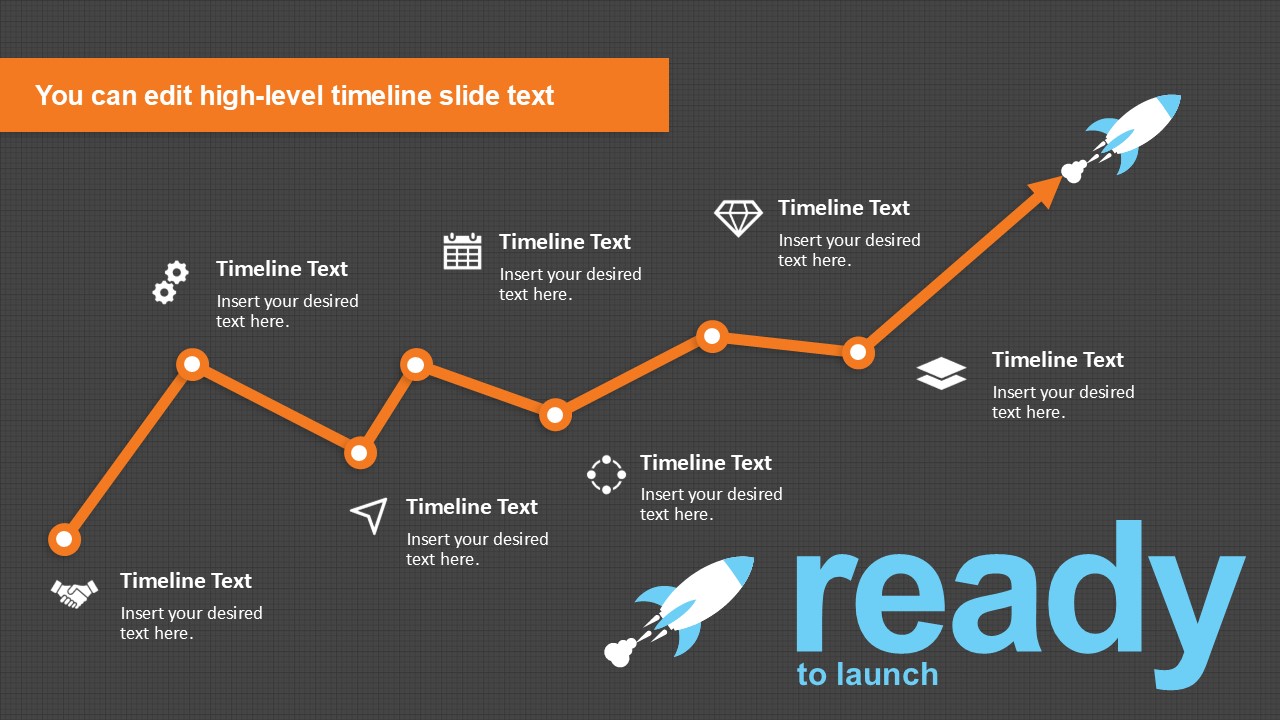
The 7-Item High-Level Timeline Template for PowerPoint has two slides with the same central diagram but different arrangement of shapes and title texts. The first slide has a large blue title text at the upper right section of the slide. The main diagram resembles a line graph, starting from the bottom level and moving upwards. The line graph has multiple bends; at each bend, a circular dot represents a significant milestone, after which the line moves upwards or downwards, depicting specific situations. Corresponding to these events, we have provided infographic icons and placeholder text sections so that users can effectively showcase various key points. Project managers can write the details of each milestone at multiple steps in the line graph, leading to project success.
At the top of the line graph is an arrowhead and a rocket infographic indicating the achievement of the objective, project completion, or growth stage. A bar-shaped text section is provided on the lower right side of the slide. Furthermore, the title text and bar positions are at alternative positions in the second slide, while all the other elements are the same. Users can modify the shapes, icons, colors, or fonts used in the template to fit their needs accurately. They can also repurpose the template to present the topic of their choice. Download our high-level timeline PPT template and try it now for your executive presentations! Also, check our complete collection of timeline templates.
What’s inside this template
Example presentation scenarios
- A project manager can brief executives on a major initiative by placing the seven key milestones on the ascending timeline and using the rocket marker as the completion point.
- A product lead can outline a launch plan for stakeholders by using the icon callouts to label discovery, build, testing, release, and post-launch checkpoints.
- A growth manager can present business progress to leadership by mapping stage-by-stage development along the upward line and using the final rocket as the target state.
- A consultant can summarize a client roadmap by replacing each milestone text area with phase names, decision points, and expected outcomes.
Features
- 100% editable presentation template
- Compatible with Microsoft PowerPoint and Google Slides
- 16:9 aspect ratio slides
- Scalable vector shapes, icons and illustrations
- AI-Ready for Microsoft Copilot and Claude
- Instant access and download
Frequently asked questions
Q: How should I present the seven milestones without overcrowding the slide?
A: Treat each milestone label as a headline, not a paragraph. Use the icon callouts for short phase names or decisions, then explain the details verbally. The upward line already communicates progress, so the text should clarify what changes at each point and why the final rocket marker represents completion or launch readiness.
Q: Who benefits most from this timeline format?
A: This format works best for project managers, product teams, consultants, and growth leaders who need to explain a path from starting point to target outcome. It is suited to executive updates, launch briefings, and high-level process summaries where the audience needs sequence and direction more than task-level detail.
Q: Why does the rocket metaphor improve the timeline message?
A: The rocket gives the final point a clear visual meaning: launch, achievement, or acceleration. Combined with the rising orange line, it turns a list of milestones into a directional story. The viewer can quickly read the path as progress toward a defined objective instead of disconnected events.



7-Item High-Level Timeline Template for PowerPoint
2-slide presentation template with a 7-item timeline, milestone icons, and rocket goal marker
The 7-Item High-Level Timeline Template for PowerPoint is a 2-slide timeline presentation template for showing milestone-based growth or project progress. It includes an ascending 7-point line timeline, icon callouts, a rocket completion marker, and editable title and text bars for project managers, growth teams, and executives using Microsoft PowerPoint or Google Slides.
- Category
- Timelines & Planning
- Rating


 Loading...
- Aspect ratio
- 16:9
- Item ID
- 22640-01
- Colors
 Microsoft PowerPoint
 Microsoft Copilot
 Claude for PowerPoint
Other formats supported
Subscribe today and get immediate
access to download our PowerPoint templates.