Present the key topics in your presentation with our customizable 5-Item Agenda Infographic PowerPoint Template. Strategy leaders, at the start of their corporate workshops and stakeholder review presentations, use the five-item agenda slide to highlight the sequence of modules they will review. HR managers review their talent recruitment process during team presentations using our editable 5-item agenda infographic template. Also, this PPT template can be used for a Google Slides presentation. If you want to present business roadmaps or stepwise process frameworks, visit our collection of process diagram templates.
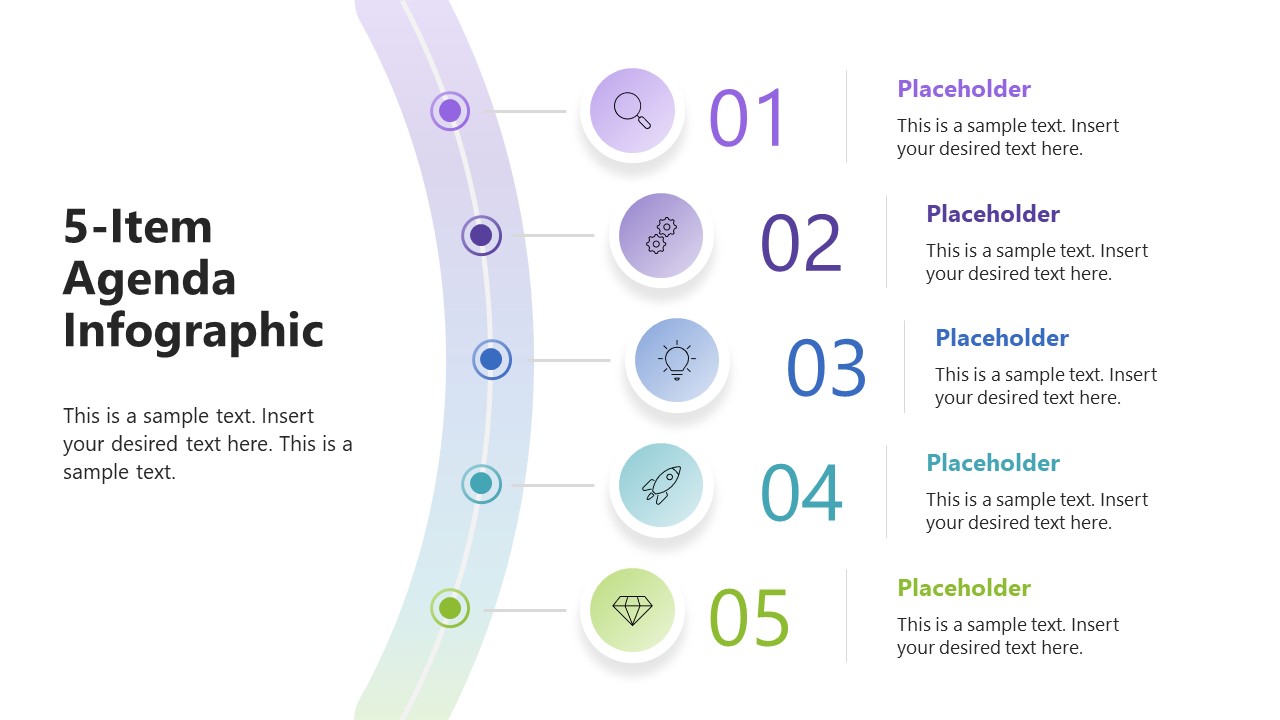
The 5-Item Agenda Infographic PowerPoint Template features two slides with the same graphical arrangement but different background colors. The first slide has a white background, while the second slide has a dark navy background. The slide shows a curved road with five colorful spots on it. Project managers use bold numbers and infographics wth each step on the road. This helps them give an overview of the project execution plan in a continuous format. Product developers use this slide diagram to highlight the features of the development plan in the SaaS product. SEO team leaders share the roadmap for achieving SERP rankings using the five-step infographic. They discuss the parameters that boost search engine rankings in the team presentations.
Moreover, we enable users to modify the colors or graphical layout to perfectly match their needs. We also allow corporate presenters to change fonts to match company branding elements. Download the 5-item agenda infographic PPT template for executive presenters to clearly communicate a strategic action plan for business growth.
What’s inside this template
Example presentation scenarios
- A project manager can use the five numbered agenda items to introduce the phases of a kickoff meeting and show the team how the discussion will move from planning to execution.
- An HR manager can present a recruitment process overview by assigning each circular icon marker to one step, such as sourcing, screening, interviewing, selection, and onboarding.
- A product manager can use the curved road diagram to outline a development plan and explain how five planned workstreams connect in sequence.
- A marketing lead can use the text blocks and numbered labels to brief a team on a five-part SEO or campaign action plan before assigning detailed tasks.
Features
- 100% editable presentation template
- Compatible with Microsoft PowerPoint and Google Slides
- 16:9 aspect ratio slides
- Scalable vector shapes, icons and illustrations
- AI-Ready for Microsoft Copilot and Claude
- Instant access and download
Frequently asked questions
Q: How can I use this slide to communicate an agenda clearly?
A: Start with the left title and short intro to state the meeting purpose, then walk down the five numbered items in order. Keep each text block to one concise outcome or topic. The icon circles should act as memory cues, not decoration, so choose icons that match the agenda meaning.
Q: Who is this template best suited for?
A: This template fits presenters who need to orient an audience before a structured discussion, such as project managers, HR leaders, product managers, and workshop facilitators. It works best when the content can be reduced to five clear parts, including agenda sections, process stages, roadmap milestones, or training modules.
Q: Why use a curved road instead of a plain numbered list?
A: The curved road gives the audience a simple journey metaphor: the presentation will move through five stops in a planned order. That visual cue makes the agenda feel connected rather than fragmented. The large numbers support scanning, while the icon markers help viewers remember the role of each agenda item.


5-Item Agenda Infographic PowerPoint Template
2-slide agenda presentation template with curved roadmap diagram and five numbered topics
The 5-Item Agenda Infographic PowerPoint Template is a 2-slide diagram template for introducing five agenda topics, process steps, or roadmap milestones. It includes a curved road metaphor, numbered icon markers, and text placeholder blocks in light and dark background versions for business presenters using Microsoft PowerPoint or Google Slides.
- Category
- Diagrams
- Rating

 Loading...
- Aspect ratio
- 16:9
- Item ID
- 23759-01
- Colors
 Microsoft PowerPoint
  Microsoft Copilot
  Claude for PowerPoint
 Other formats supported
Subscribe today and get immediate
access to download our PowerPoint templates.