Slide 1 of 2 from 4-Level Security Data Center Diagram PowerPoint Template
Editable 4-Level Security Data Center Diagram Layout
4-Layer Security Data Center Diagram
- Diagram
- Layered Stack
- Strategic Analysis Slide
- 16:9
- 100% Editable
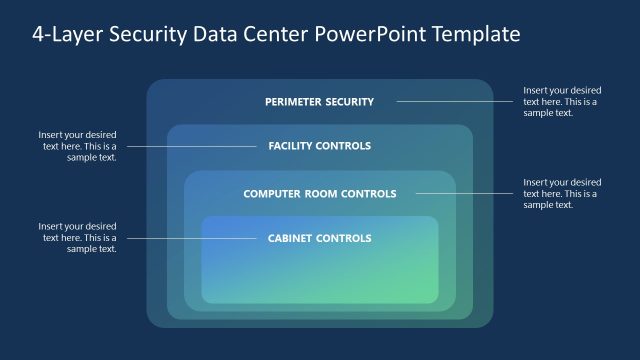
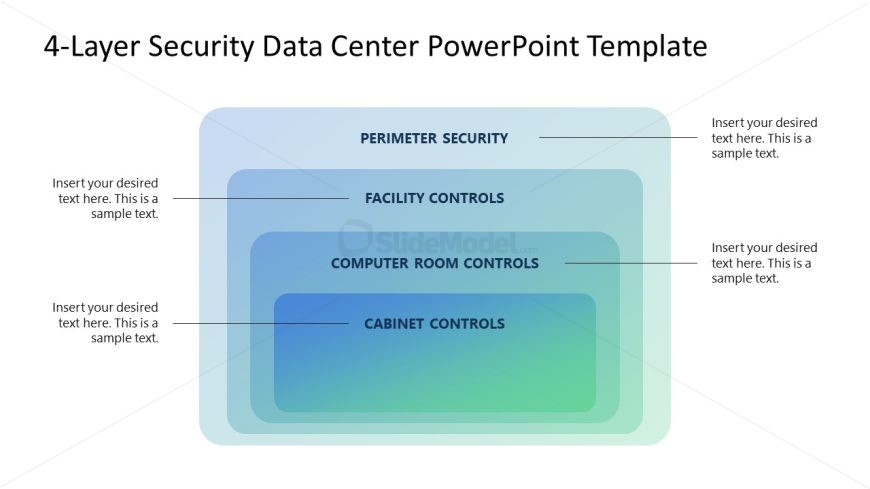
The 4-Layer Security Diagram from the 4-Level Security Data Center Diagram PowerPoint Template visually organizes key security levels in IT environments. This slide layout uses editable shapes and vector icons to clearly differentiate perimeter, facility, computer room, and cabinet controls, making it suitable for corporate presentations and training sessions focused on layered security strategies within data centers.
What’s on This Slide
The layout features four horizontal layers, each representing a level of security. The top layer is labeled 'Perimeter Security,' followed by 'Facility Controls,' 'Computer Room Controls,' and 'Cabinet Controls' at the bottom. Each layer has a corresponding text placeholder aligned to the right, with a horizontal line separating the layers. The background displays a gradient transitioning from light blue at the top to green at the bottom, creating a visual hierarchy. The overall composition is centered, with clear boundaries around each layer.
How to Use It
This layout serves as a layered diagram to illustrate security levels in a data center. It is suitable for presentations discussing IT security strategies or frameworks. The structure allows for clear differentiation of each security layer, making it effective for training sessions or strategic planning discussions. It fits well in a sequence following an overview of security challenges, providing a visual representation of solutions.
Text Placeholders & Capacity
Keep your copy within these limits so it fits without resizing. Node body slots are tight, roughly 10-12 words each.
| Placeholder | Count | Max characters (approx.) |
|---|---|---|
| Item heading | 4 | 30 |
| Item body | 4 | 50 |
Slide Keywords
Download unlimited PowerPoint templates, charts and graphics for your presentations with our annual plan.
DOWNLOADReturn to 4-Level Security Data Center Diagram PowerPoint Template.