Slide 1 of 2 from 5-Level Security Layers PowerPoint Template
Editable 5-Level Security Layers PPT Slide Template
5-Level Security Layers Diagram for Presentations
- Diagram
- Layered Stack
- Concept Explanation Slide
- 16:9
- 100% Editable
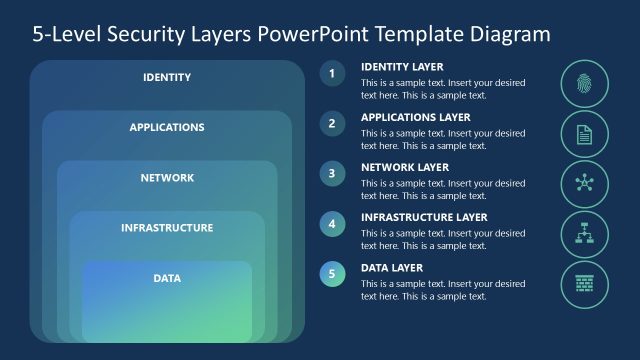
The 5-Level Security Layers Diagram from the 5-Level Security Layers PowerPoint Template visually breaks down cybersecurity concepts into five hierarchical layers, making it suitable for IT security strategy discussions and corporate presentations. This slide layout uses editable shapes and vector icons to clearly illustrate each security level, enhancing business presentations and pitch decks focused on security frameworks.
What’s on This Slide
The slide features a vertical diagram with five layers representing security levels. Each layer is a rounded rectangle, stacked from top to bottom, with a gradient color scheme transitioning from light to dark blue. The top layer is labeled 'IDENTITY,' followed by 'APPLICATIONS,' 'NETWORK,' 'INFRASTRUCTURE,' and 'DATA' at the bottom. Each layer has a corresponding icon on the right side, with text placeholders aligned vertically next to each layer, allowing for detailed descriptions. The overall layout emphasizes a clear hierarchy from top to bottom.
How to Use It
This layout serves as a structured representation of layered security concepts, ideal for presentations on cybersecurity strategies. It fits well after an introduction to security challenges, providing a visual breakdown of security levels. This diagram can be used in business contexts where explaining security frameworks is necessary, such as IT security briefings or strategic planning sessions. It effectively communicates the importance of each layer in a security system.
Text Placeholders & Capacity
Keep your copy within these limits so it fits without resizing. Node body slots can hold roughly 15-20 words each.
| Placeholder | Count | Max characters (approx.) |
|---|---|---|
| Item heading | 5 | 30 |
| Item body | 5 | 100 |
Slide Keywords
Download unlimited PowerPoint templates, charts and graphics for your presentations with our annual plan.
DOWNLOADReturn to 5-Level Security Layers PowerPoint Template.