Slide 2 of 4 from Free Thermometer Slides for PowerPoint
PowerPoint Thermometer Template Rising Temperature
Thermometer Slide with Data Indicators
- Diagram
- Other
- Evaluation Slide
- 16:9
- 100% Editable
The Thermometer with Data Indicators slide from the Free Thermometer Slides for PowerPoint template offers a clear visual tool for KPI tracking and sales performance. This slide layout combines editable shapes and vector icons to present quantitative data effectively, making it suitable for business presentations and project milestone updates within a professional slide deck.
What’s on This Slide
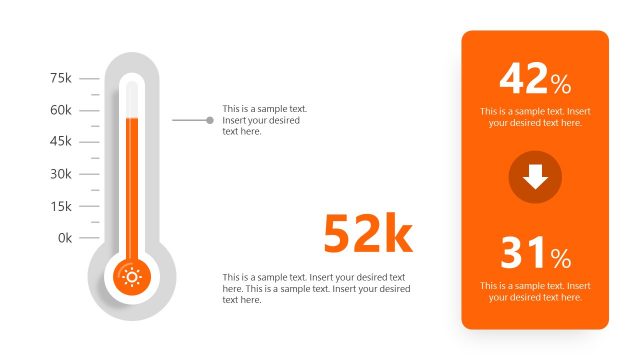
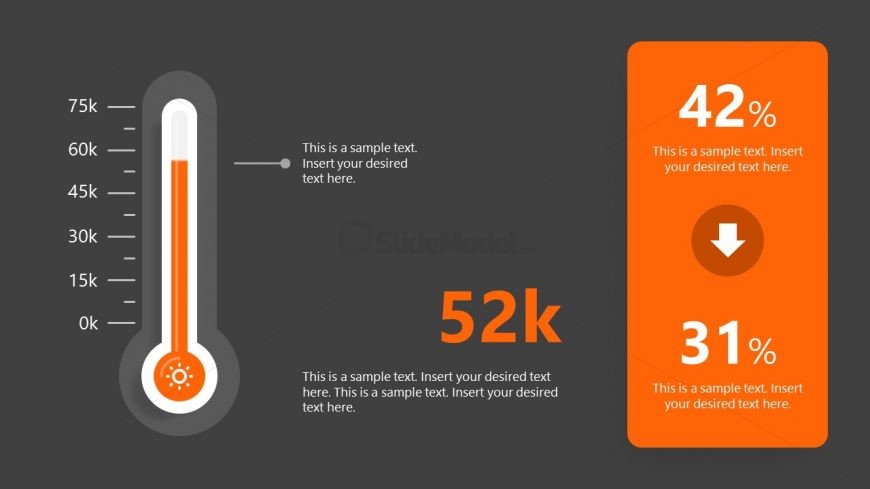
The layout features a thermometer graphic positioned on the left side, displaying a gradient fill that indicates a value of 52k. The thermometer has numerical markers ranging from 0k to 75k. To the right, there is a rectangular orange box containing two data points: 42% at the top and 31% below, with an arrow icon indicating a downward trend. Text placeholders are present in both sections, aligned to provide clear visual hierarchy. The background is dark gray, enhancing the contrast of the elements.
How to Use It
This layout serves as a data visualization tool, effectively communicating metrics or performance indicators. It fits well in presentations that require a quick overview of progress or comparisons. Suitable scenarios include sales performance updates, project milestones, or KPI tracking. The thermometer can represent goals, while the accompanying data points provide context. This slide is best used after introducing a topic that requires quantitative assessment.
Text Placeholders & Capacity
Keep your copy within these limits so it fits without resizing. Body slots are tight, roughly 10 words each.
| Placeholder | Count | Max characters (approx.) |
|---|---|---|
| Item body | 1 | 60 |
| Item body | 1 | 60 |
| Item body | 1 | 60 |
| Item heading | 1 | 10 |
| Item heading | 1 | 10 |
| Item heading | 1 | 10 |
Slide Keywords
Download unlimited PowerPoint templates, charts and graphics for your presentations with our annual plan.
DOWNLOADReturn to Free Thermometer Slides for PowerPoint.