Slide 11 of 14 from Welcome to My Presentation PowerPoint Template
Progress & Results Overview – Welcome to My Presentation Slide Deck
Progress & Results Slide Overview
- Text Layout
- Other
- Evaluation Slide
- 16:9
- 100% Editable
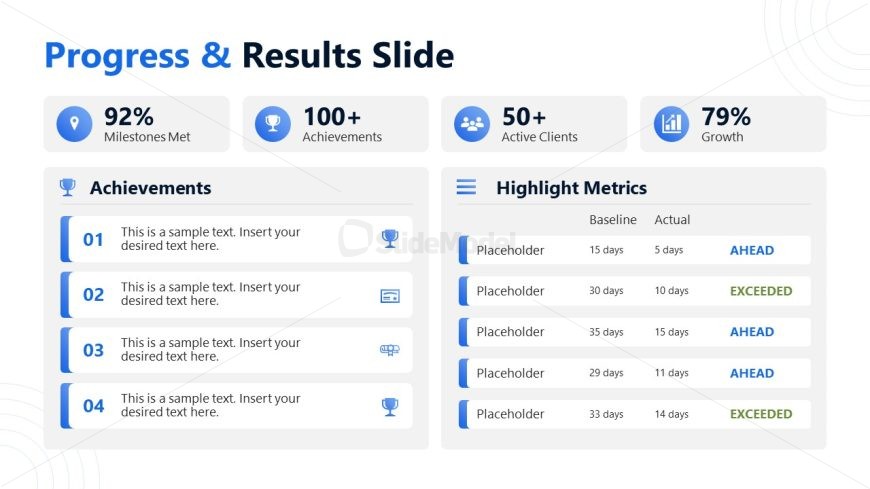
The Progress & Results Slide from the Welcome to My Presentation PowerPoint Template offers a structured layout ideal for business presentations, enabling clear communication of project updates and performance metrics. This slide template features editable shapes and vector icons to visually emphasize achievements and milestones, making it a practical choice for corporate presentations and stakeholder reports within a professional slide deck.
What’s on This Slide
The layout features a two-column structure with a prominent title at the top. The left column displays key metrics, including percentages and counts, with icons representing achievements and milestones. Below this, there are four text placeholders labeled 'Achievements' with numbered sections for detailed descriptions. The right column contains a 'Highlight Metrics' section, featuring a table with placeholders for baseline and actual metrics, along with status indicators. The overall color scheme is blue and white, with a clean, organized visual hierarchy that separates the two columns distinctly.
How to Use It
This layout serves as a progress and results overview, ideal for showcasing achievements and performance metrics in a business context. It fits well in a presentation sequence following problem identification and before strategic recommendations. Use this structure to summarize project milestones, client achievements, or team performance metrics, making it suitable for stakeholder updates or team meetings. The clear division of metrics allows for easy comparison and highlights key accomplishments effectively.
Text Placeholders & Capacity
Keep your copy within these limits so it fits without resizing. Node body slots can hold roughly 15-20 words each.
| Placeholder | Count | Max characters (approx.) |
|---|---|---|
| Slide title | 1 | 30 |
| Item heading | 4 | 50 |
| Item body | 4 | 100 |
| Chart title | 1 | 30 |
| Cell | 5 | 30 |
Slide Keywords
Download unlimited PowerPoint templates, charts and graphics for your presentations with our annual plan.
DOWNLOAD