Slide 6 of 12 from Website Performance PowerPoint Template
User Journey & Page Journey Analysis Slide Template
User Experience & Page Journey Analysis Slide
- Table
- Comparison Table
- Evaluation Slide
- 16:9
- 100% Editable
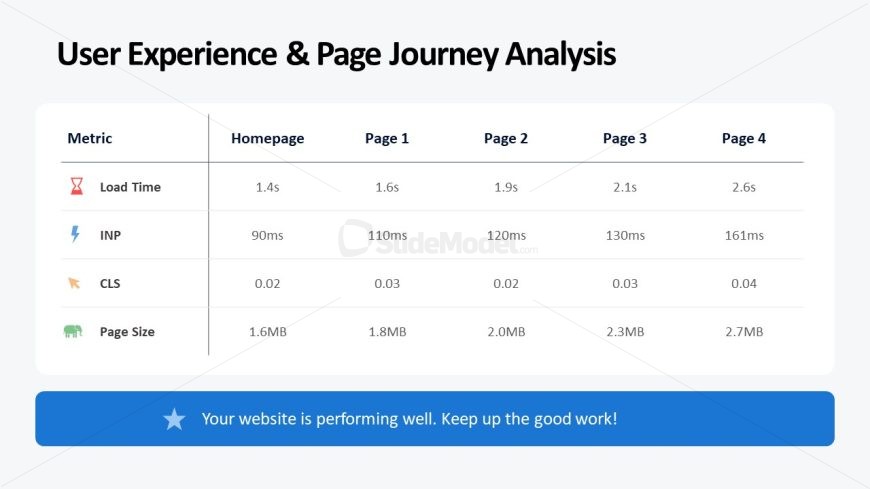
The User Experience & Page Journey Analysis slide from the Website Performance PowerPoint Template offers a clear comparison table to evaluate key website metrics across multiple pages. This slide layout supports business presentations focused on digital marketing assessments and user experience analysis by showcasing essential data like load time and page size with editable shapes and vector icons for clarity.
What’s on This Slide
The layout features a table positioned centrally, displaying metrics for four pages. The table has four columns labeled 'Homepage,' 'Page 1,' 'Page 2,' 'Page 3,' and 'Page 4,' with rows for 'Load Time,' 'INP,' 'CLS,' and 'Page Size.' Each cell contains numerical data, with icons representing metrics beside their labels. A prominent title is placed above the table, while a callout at the bottom encourages positive feedback. The background is light gray, enhancing readability and visual separation of elements.
How to Use It
This layout serves as a comparative analysis of website performance metrics across multiple pages. It fits well after presenting initial findings and before recommendations, providing a clear overview of user experience. Suitable for reports on website audits, performance reviews, or digital marketing assessments, it allows stakeholders to quickly grasp key performance indicators and identify areas for improvement.
Text Placeholders & Capacity
Keep your copy within these limits so it fits without resizing. Node labels can accommodate up to 10 characters each.
| Placeholder | Count | Max characters (approx.) |
|---|---|---|
| Slide title | 1 | 30 |
| Item heading | 4 | 10 |
| Item body | 16 | 10 |
| Callout | 1 | 60 |
Slide Keywords
Download unlimited PowerPoint templates, charts and graphics for your presentations with our annual plan.
DOWNLOADReturn to Website Performance PowerPoint Template.