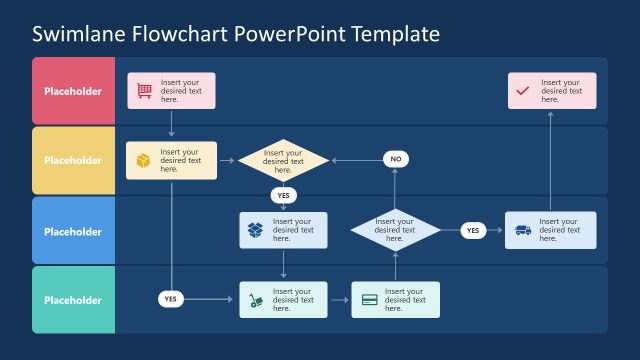
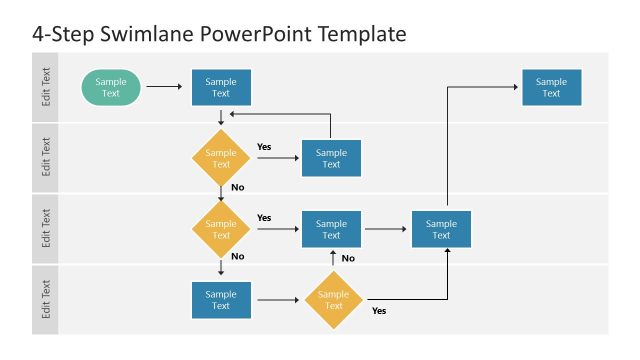
Download our creative and Simple Swimlane PowerPoint Template crafted using multi-color text boxes and editable placeholders. Swimlane diagrams are easy-to-understand flow diagrams used to describe the roles of individuals working at different stages of the process. Thus, instead of creating simple flow charts, it is beneficial to sketch the swimlanes that help discuss the responsibilities of the professionals and their respective positions. We have provided this 100% editable swimlane diagram for our business, educational, or marketing users. They can easily download and customize it using all PowerPoint versions, Google Slides, and Keynote software. Users can choose from the two color variant slides and use them in their presentations.
This Simple Swimlane PowerPoint Template slide has five horizontal rows, each beginning with a bright color block of representative graphical icons. The rows carry corresponding color shades with white colored text boxes that are vertically connected, making a swimlane representation. The rows display the operational process steps, i.e., purchasing, production, logistics, supplier, and control. The clipart icons also showcase the concept of the process step.
Users can insert their relevant data in the provided boxes and change their numbers by duplicating or removing them based on their requirements. Likewise, the stage titles can be modified according to the process under discussion. The following slide has a similar structure but contains color-coded boxes instead of white ones. So, users can conveniently download this simple 5-step swimlane PPT template for their process presentation and create engaging swimlane presentations without special efforts. Alternatively, you can download other swimlane presentation templates for PowerPoint & Google Slides.
What’s inside this template
Example presentation scenarios
- An operations manager can use the swimlane diagram to explain how purchasing, production, logistics, supplier, and control teams share responsibility for a workflow.
- A business analyst can present a process improvement discussion by placing current-state activities in the editable step boxes and using the connector arrows to show handoffs.
- A project manager can align stakeholders before implementation by assigning each lane to a team and showing where approvals or dependencies occur.
- A training facilitator can teach a new process by walking learners through each lane label, icon header, and connected activity box in order.
Features
- 100% editable presentation template
- Compatible with Microsoft PowerPoint and Google Slides
- 16:9 aspect ratio slides
- Scalable vector shapes, icons and illustrations
- AI-Ready for Microsoft Copilot and Claude
- Instant access and download
Frequently asked questions
Q: How should a presenter explain the swimlane diagram without overwhelming the audience?
A: Start with the lane labels before discussing individual boxes. Clarify what each row represents, then follow the connector arrows from left to right and top to bottom. This keeps the audience focused on ownership first, sequence second, and handoffs third, which is the main value of a swimlane diagram.
Q: Who is this template best suited for in a business presentation?
A: It fits presenters who need to explain shared responsibility across functions, such as operations managers, process analysts, project managers, and training leads. The five visible lanes work well for processes involving departments, vendors, controls, or approval roles where a simple flowchart would hide who owns each step.
Q: Why use a swimlane layout instead of a standard process flow?
A: A standard flow shows sequence, but this design also shows accountability. The horizontal lanes separate roles, the colored icon blocks make each lane easy to scan, and the vertical connectors reveal cross-team handoffs. That structure helps audiences identify delays, unclear ownership, and dependencies faster.


Simple Swimlane PowerPoint Template
2-slide presentation template with swimlane process diagrams, role lanes, icons, and connector flows
The Simple Swimlane PowerPoint Template is a 2-slide process diagram deck for Microsoft PowerPoint and Google Slides. It includes two 16:9 swimlane variants with five horizontal role lanes, icon headers, editable step boxes, and vertical connector arrows for mapping responsibilities across purchasing, production, logistics, supplier, and control stages.
- Category
- Process Diagrams
- Rating

 Loading...
- Aspect ratio
- 16:9
- Item ID
- 22100-01
 Microsoft PowerPoint
 Microsoft Copilot
 Claude for PowerPoint
Other formats supported
Subscribe today and get immediate
access to download our PowerPoint templates.