Slide 1 of 1 from Rabbit Hole PowerPoint Template
Editable Rabbit Hole Presentation Template
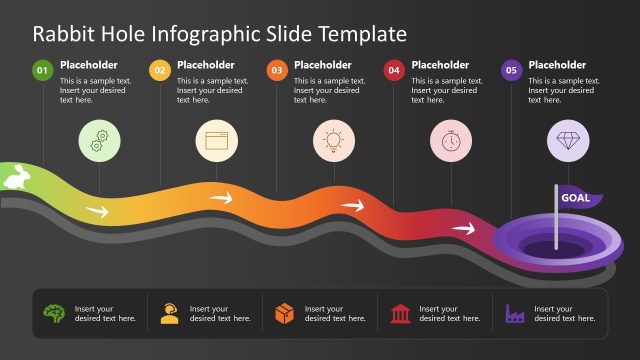
Five-Step Path to Target Diagram
- Diagram
- Process Flow
- Process Slide
- 16:9
- 100% Editable
The Five-Step Path to Target slide from the Rabbit Hole PowerPoint Template offers a clear process flow diagram ideal for project planning and business presentations. This slide layout uses editable shapes and vector icons to highlight sequential milestones, making it a practical choice for corporate presentations and training sessions that require a structured visual of complex processes.
What’s on This Slide
The layout features a curved underground route with five numbered milestones, each represented by a colored segment. The segments are arranged horizontally, with the first segment on the left and the fifth on the right. Each segment contains a placeholder for text, aligned centrally. Below the segments, a segmented footer bar holds additional placeholders. Icons are positioned within the segments, indicating different stages of the process. A rabbit and a sign are placed at the top left, adding a thematic element. The background is a gradient of green and dark colors.
How to Use It
This layout serves as a process flow diagram, illustrating a five-step journey toward a target. It fits well in presentations focused on project planning, learning processes, or business goals. The visual structure allows for clear communication of sequential steps, making it suitable for training sessions or strategic planning meetings. Use it to guide audiences through complex processes in a straightforward manner, emphasizing key milestones along the way.
Text Placeholders & Capacity
Keep your copy within these limits so it fits without resizing. Node body slots can hold roughly 15-20 words each.
| Placeholder | Count | Max characters (approx.) |
|---|---|---|
| Item heading | 5 | 30 |
| Item body | 5 | 100 |
| Footer | 2 | 50 |
| Slide title | 1 | 50 |
Slide Keywords
Download unlimited PowerPoint templates, charts and graphics for your presentations with our annual plan.
DOWNLOADReturn to Rabbit Hole PowerPoint Template.