Slide 2 of 2 from Profitability Matrix PowerPoint Template
Editable Profitability Matrix PowerPoint Slide
Profitability Matrix PowerPoint Template
- Diagram
- Matrix Quadrant
- Strategic Analysis Slide
- 16:9
- 100% Editable
What’s on This Slide
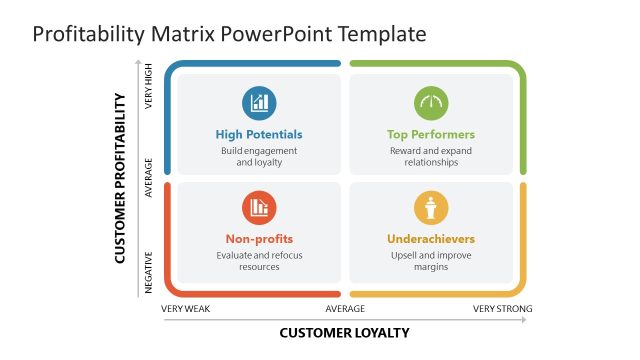
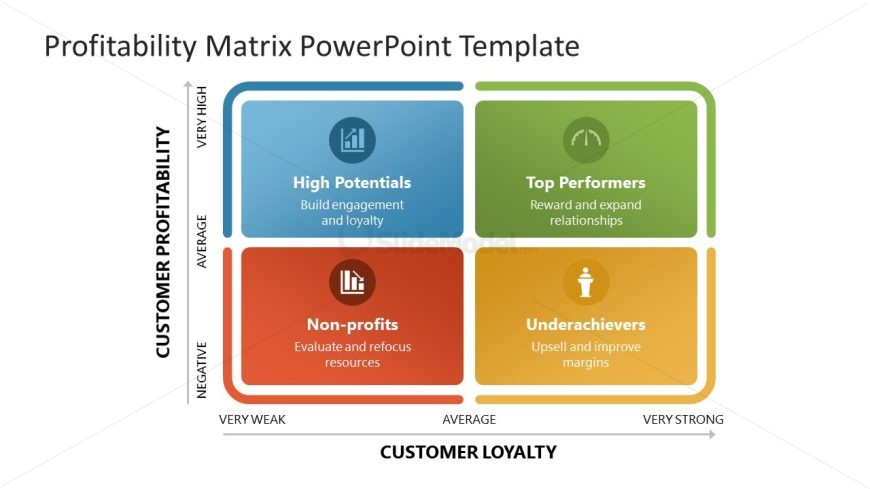
The layout features a four-quadrant matrix chart positioned centrally. Each quadrant is labeled with distinct categories: 'High Potentials,' 'Top Performers,' 'Non-profits,' and 'Underachievers.' The quadrants are colored differently, with blue, green, orange, and red backgrounds. Icons representing each category are placed in the upper left and lower left quadrants. Text placeholders for category descriptions are located beneath each label, aligned centrally. The overall composition is structured with a horizontal axis for customer loyalty and a vertical axis for customer profitability, creating a clear visual hierarchy.
How to Use It
This layout serves as a profitability matrix, ideal for evaluating customer segments based on profitability and loyalty. It fits well after problem identification slides, providing a strategic analysis of customer performance. This structure is useful in business contexts such as performance reviews, customer segmentation, and strategic planning. It allows for visual comparison of customer categories, aiding in decision-making processes regarding resource allocation and marketing strategies.
Text Placeholders & Capacity
Keep your copy within these limits so it fits without resizing. Node labels can hold about 30 characters each.
| Placeholder | Count | Max characters (approx.) |
|---|---|---|
| Item heading | 4 | 30 |
| Item body | 4 | 50 |
Slide Keywords
Download unlimited PowerPoint templates, charts and graphics for your presentations with our annual plan.
DOWNLOADReturn to Profitability Matrix PowerPoint Template.