Customize our One Pager Executive Summary PowerPoint Template to present the vision and mission of your company leaders in an impactful way. Every organization has certain goals and objectives for its action plans. We have crafted this fantastic template to help professionals clearly communicate their mission and vision to other companies or investors. All the template components are editable, and presenters can modify them to fit their needs accurately. Further, our slide layout is also compatible with Google Slides and Keynote. Users can change the PPT elements of the template to suit their needs. They can change the graphical icons, shapes, images, and other components of the template. They can also repurpose the template to showcase their relevant topics.
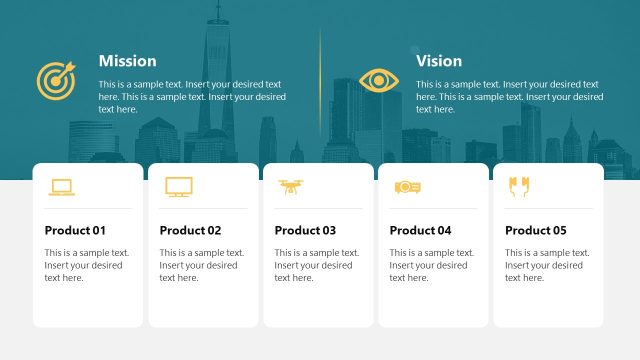
The One Pager Executive Summary PowerPoint Template consists of two slides with a similar layout but slight variations for executive summary presentation. The first slide has a blue upper slide section with two infographics and editable textboxes, one for showing the mission and the other for vision. Next, we have five rectangular sections placed vertically. Each section is specific to one goal and contains an infographic icon relevant to the point of discussion. The second slide is similar to the first one, but the arrangement of textboxes is different, i.e., it contains the icon at the top, and the users can present other points like KPIs, metrics, data points, or business process steps. Moreover, project managers can visualize the milestones using this interactive slide diagram.
Download this impressive one-page executive summary PPT template and customize it for your business presentations. Try it now!
Alternatively, check our article about one pager examples, our collection of one pager templates and executive summary templates.
What’s inside this template
Example presentation scenarios
- A founder can present a company introduction to investors by using the mission and vision header to state direction and the five goal cards to outline near-term priorities.
- A project manager can brief senior stakeholders by replacing the five card labels with milestones, risks, owners or next steps while keeping the mission and vision section as context.
- An HR leader can create a concise executive profile by using the top section for leadership purpose and the five icon cards for competencies, achievements or focus areas.
- A consultant can summarize a strategic recommendation by placing the client objective in the mission area, the desired future state in the vision area and the five cards for action themes.
Features
- 100% editable presentation template
- Compatible with Microsoft PowerPoint and Google Slides
- 16:9 aspect ratio slides
- Scalable vector shapes, icons and illustrations
- AI-Ready for Microsoft Copilot and Claude
- Instant access and download
Frequently asked questions
Q: How should a presenter structure the message on this one-pager?
A: Start with the mission and vision because those two blocks create the frame for every card below. Keep each goal or summary card to one idea, one short label and a brief proof point. The layout works best when the five cards are parallel, such as five goals, five milestones or five priorities.
Q: Who is this template best suited for?
A: This template fits presenters who need an executive-level snapshot rather than a full narrative deck. Founders, department heads, consultants and project managers can use it when the audience needs quick alignment on purpose, direction and top priorities. It is especially useful before a deeper discussion or as a meeting leave-behind.
Q: Why does the design use a mission and vision header above five cards?
A: The stacked structure separates strategic intent from execution details. Mission and vision sit in the darker header, giving them visual weight, while the five white cards create a clean reading path for goals or actions. The target, eye and support icons act as simple metaphors for focus, foresight and execution.


One Pager Executive Summary PowerPoint Template
2-slide presentation template for executive summary, mission and vision one-pagers
The One Pager Executive Summary PowerPoint Template is a 2-slide business template for summarizing mission, vision, goals and key points on one slide. It includes a mission and vision header, five vertical goal cards, and an alternate five-card icon summary layout for executives, managers and founders in Microsoft PowerPoint and Google Slides.
- Category
- Business PowerPoint Templates
- Rating


 Loading...
- Aspect ratio
- 16:9
- Item ID
- 22493-02
- Colors
 Microsoft PowerPoint
 Microsoft Copilot
 Claude for PowerPoint
Other formats supported
Subscribe today and get immediate
access to download our PowerPoint templates.