Creating an impressive and simple resume has now become easier with this One-page Personal Resume PowerPoint Template. Professionals often strive to design their resumes in a way that can display all information about the person on a single page. However, it’s not easily achievable because showing a complete work history and education in a straightforward format is time-consuming and sometimes impossible. With this resume PPT template, users can arrange their data in a different structure that can fit a lot of data without crossing the limit of a single page. As a plus, this one pager template is compatible with PowerPoint. Users can grab it, put in their data points on the specific segments, and create their CVs without effort. Further, it can also fit different slide sizes and be printed for physical presentation to employers.
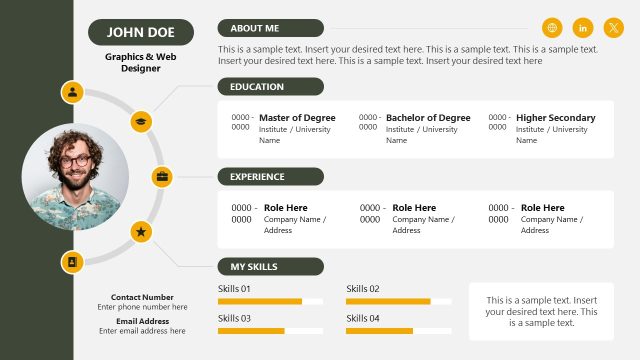
This One-page Personal Resume PowerPoint Template carries a square layout for adding information. In the center of the slide, there is space to add a picture of the person in a circular shape. Above this image placeholder, the contract information like phone number or email can be mentioned, and there are social media icons to add social media account links. Likewise, the bottom part of this square block mentions the person’s name and designation. Users can conveniently edit the text to insert their data. On the left-hand side of this central square, there are line-separated sections to mention details like educational milestones and languages. The right-hand side is to display the work experience. The segments to add the educational and experience history have sections segregated using thin horizontal lines. Presenters can add time range, title of course or job, short captions, or institute names. This one-pager resume PPT template also provides a short space to add professional skills.
So, this PPT slide template can help create a thorough resume for any expertise or educational level. Download and populate the slide with the required information. You can also check out our collection of resume templates to select the resume of your choice. Alternatively, you can download other PPT templates and presentation designs.
What’s inside this template
Example presentation scenarios
- A job seeker can present a concise professional profile before an interview using the contact header, circular profile photo, work experience entries, and skill bars.
- A recruiter can summarize a shortlisted candidate for a hiring manager by filling the education column, experience timeline entries, achievements, and soft skill list.
- A university career advisor can help students prepare a single-page CV by replacing the sample education milestones, social links, and skills with graduate profile content.
- A consultant or freelancer can introduce personal credentials in a pitch meeting using the profile photo area, designation line, achievements section, and hard skill bars.
Features
- 100% editable presentation template
- Compatible with Microsoft PowerPoint
- 16:9 aspect ratio slides
- Scalable vector shapes, icons and illustrations
- AI-Ready for Microsoft Copilot and Claude
- Instant access and download
Frequently asked questions
Q: How should a presenter decide what to include on this one-page resume?
A: Start with the role being targeted, then keep only the details that support that role. The profile photo and name establish identity, the work experience column should carry the strongest evidence, and the education, achievements, and skill bars should reinforce fit. Avoid filling every line if a cleaner hierarchy makes the candidate easier to scan.
Q: Who is this template best suited for in a hiring or career setting?
A: This template fits candidates, recruiters, and career coaches who need a fast visual summary instead of a long resume deck. It is especially useful when a hiring manager needs to compare a candidate's education, work history, achievements, and skills on a single screen or printed page.
Q: Why does the square resume layout help communicate a candidate profile?
A: The design places the person at the center with a circular photo, name, and designation, then surrounds that identity with proof points. Contact details sit at the top for quick access, while education and experience columns create an easy left-to-right scan. Skill bars add a quick visual cue without turning the resume into a chart deck.


One-page Personal Resume PowerPoint Template
2-slide resume presentation template with contact header, profile photo, education, experience and skills sections
The One-page Personal Resume PowerPoint Template is a 2-slide resume deck for Microsoft PowerPoint. It presents a single-page CV layout with a contact header, circular profile photo, education and work experience columns, achievements, and skill bars. It is intended for job candidates, recruiters, and career presentation materials.
- Category
- Business PowerPoint Templates
- Rating

 Loading...
- Aspect ratio
- 16:9
- Item ID
- 22191-01
- Colors
 Microsoft PowerPoint
 Microsoft Copilot
 Claude for PowerPoint
Other formats supported
Subscribe today and get immediate
access to download our PowerPoint templates.