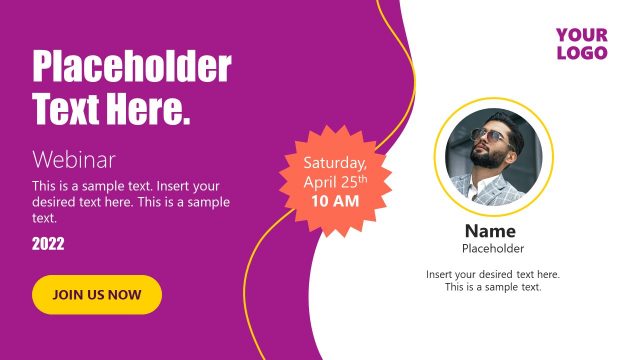
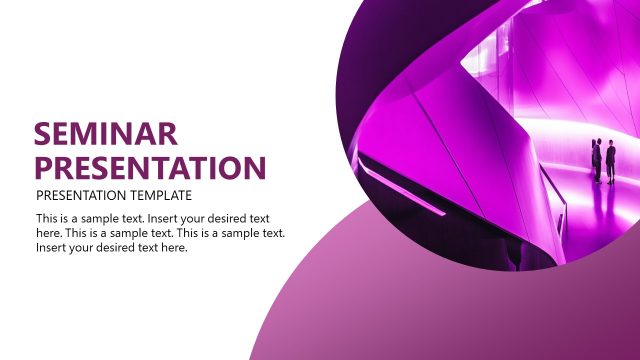
The Engaging Webinar Invitation Slide for PowerPoint is a webinar promotion template. It contains three versions of presenter slides to introduce two to four speakers. Display an overview of the presentation topic along with speakers’ information. The slides of the engaging webinar template provide structured layouts for necessary details. These include webinar heading, a brief overview, time, contact information, and speakers’ photos. The vertical tabs contain a headshot of each presenter with their name and title. The editable template enables users to customize slide contents to their needs.
Webinars are virtual events scheduled by companies and individuals for groups of people. To access webinar sessions, attendees require internet. The webinar lets people and businesses perform long-distance events. The Engaging Webinar Invitation Slide for PowerPoint invites the audience a professional look. You can use the webinar cover template and save time promoting the webinar.
The Engaging Webinar Invitation Slide for PowerPoint assists in summarizing key agenda points of the webcast. The graphic layout gets the audience’s attention and encourages them to join the webinar. The slide saves presenters time on designing slides from scratch. You can use webinar slides as title slides or cover of the webinar presentation. The slides also include a section that highlights the date and time of the event and key topics to be presented in the webinar. You can also add the webinar access URL in the invitation slide. It will help attendees to join webinars with ease.
The PowerPoint template of virtual meetings and webinar invitations outlines event information eye-catching. You can download webinar invite templates for business events or event planning PPT presentations. Take an example of virtual training and motivation sessions offered by the company.
Alternatively, you can download other webinar PPT templates with creative layouts to introduce the speakers, present your topics, key points or generate ice breakers for your webinar events.
What’s inside this template
Example presentation scenarios
- A marketing manager can promote an upcoming webinar by using the four-speaker lineup slide to show the panelists, event time, webinar topic, and contact number in one visual invitation.
- A training coordinator can announce a virtual employee learning session with the two-speaker cover slide, placing the facilitator photos beside the session title and schedule.
- A webinar host can open a live session with the three-speaker presenter layout, giving attendees a quick view of who is speaking and what the session covers.
- A sales team can invite prospects to a remote product briefing by adapting the headline, overview text, and speaker tabs to feature the account team and guest expert.
Features
- 100% editable presentation template
- Compatible with Microsoft PowerPoint and Google Slides
- 16:9 aspect ratio slides
- Scalable vector shapes, icons and illustrations
- AI-Ready for Microsoft Copilot and Claude
- Instant access and download
Frequently asked questions
Q: How should I present the webinar value without overloading the invitation slide?
A: Lead with one clear webinar promise in the large headline, then use the short overview text for the audience benefit rather than a full agenda. Keep the date and time pill highly visible, and reserve the speaker tabs for credibility cues: photo, name, and role. This keeps the invitation readable as an email graphic, title slide, or event opener.
Q: Who is this template best suited for?
A: This template fits webinar hosts, event marketers, training coordinators, and business teams promoting a virtual session with named presenters. It works best when the speaker lineup is part of the draw, such as expert panels, customer education sessions, internal training, or online briefings where attendees need the topic, schedule, and presenter credentials at a glance.
Q: Why use vertical speaker tabs instead of a standard agenda slide?
A: The vertical tabs create a speaker roster metaphor, making the presenters feel like the central attraction of the event. Photos anchor attention on the right while the headline, schedule, and contact details stay grouped on the left. This split improves scanning because viewers can quickly separate why to attend from who will lead the session.






Engaging Webinar Invitation Slide for PowerPoint
3-slide webinar invitation presentation template with speaker lineup cards and event details
This is a 3-slide webinar invitation presentation template for promoting virtual events in Microsoft PowerPoint and Google Slides. It includes a two-speaker invitation cover, a three-speaker presenter lineup, and a four-speaker panel layout with editable headline, date and time pill, overview text, contact area, photos, names, and titles.
- Category
- Template Backgrounds
- Rating


 Loading...
- Aspect ratio
- 16:9
- Item ID
- 21224-01
 Microsoft PowerPoint
 Microsoft Copilot
 Claude for PowerPoint
Other formats supported
Subscribe today and get immediate
access to download our PowerPoint templates.