Slide 3 of 4 from Design Thinking Lean Startup Agile Diagram for PowerPoint
Project Development Model Lean Startup PPT
Design Thinking Lean Startup Agile Diagram Overview
- Diagram
- Circular Cycle
- Process Slide
- 16:9
- 100% Editable
What’s on This Slide
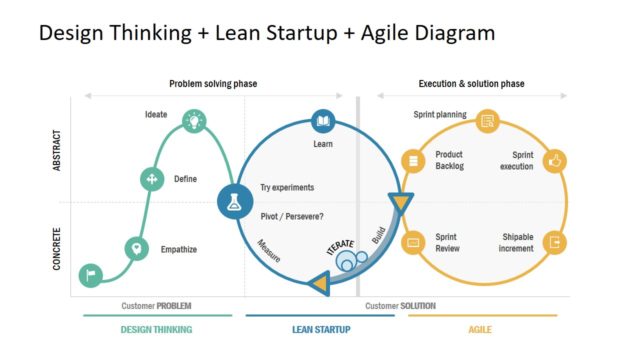
The layout features a circular diagram divided into two main phases: problem solving and execution. On the left, the problem-solving phase includes three labeled nodes: Ideate, Define, and Empathize, arranged in a curved line. The center node, labeled Learn, connects to the Lean Startup phase with arrows indicating a cycle of measuring, iterating, and building. The execution phase on the right includes four nodes: Sprint planning, Product Backlog, Sprint execution, and Shipable increment, arranged in a circular format. Text placeholders exist for titles and labels, aligned to enhance visual hierarchy.
How to Use It
This layout serves as a visual representation of the Design Thinking and Lean Startup methodologies, illustrating the iterative process of problem-solving and execution. It fits well in presentations discussing innovation strategies, agile methodologies, or project management frameworks. This diagram can be useful in workshops or training sessions focused on design thinking, allowing teams to visualize their approach to product development and customer solutions effectively.
Text Placeholders & Capacity
Keep your copy within these limits so it fits without resizing. Node labels can accommodate roughly 2-3 words each.
| Placeholder | Count | Max characters (approx.) |
|---|---|---|
| Slide title | 1 | 30 |
| Item heading | 7 | 20 |
Slide Keywords
Download unlimited PowerPoint templates, charts and graphics for your presentations with our annual plan.
DOWNLOADReturn to Design Thinking Lean Startup Agile Diagram for PowerPoint.