Slide 1 of 2 from Decision GRADE Analysis Model PowerPoint Template
Editable Decision GRADE Analysis Model PPT Template
GRADE Analysis Model Overview Slide
- Text Layout
- List Blocks
- Context Slide
- 16:9
- 100% Editable
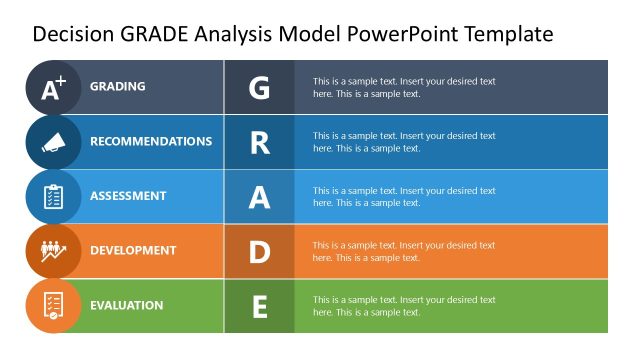
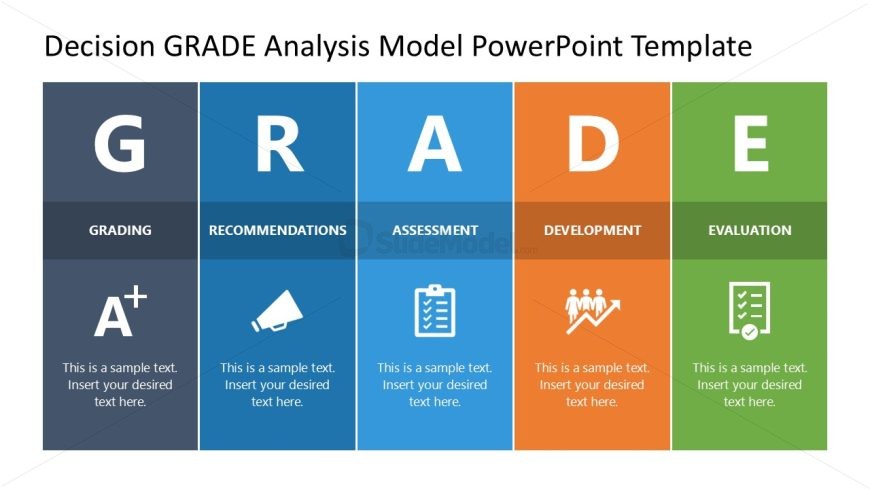
The GRADE Analysis Model Overview slide from the Decision GRADE Analysis Model PowerPoint Template presents a structured introduction to the GRADE framework using editable shapes and color-coded sections. This slide layout is designed for business presentations and strategic planning meetings, offering clear segmentation of key components to support decision-making discussions. It integrates well within slide decks focused on analytical frameworks, providing a professional foundation for training sessions and corporate presentations.
What’s on This Slide
The layout features five distinct sections arranged horizontally. Each section contains a large letter representing a component of the GRADE model: G, R, A, D, and E. Below each letter, there are descriptive labels such as 'Grading,' 'Recommendations,' 'Assessment,' 'Development,' and 'Evaluation.' Each section includes a placeholder for text, positioned centrally beneath the labels. The sections are color-coded with varying shades of blue, orange, and green, creating a clear visual hierarchy. The overall composition is balanced, with equal spacing between sections and a title at the top.
How to Use It
This layout serves as an overview of the GRADE analysis model, ideal for introducing the framework in a presentation. It effectively summarizes key components, making it suitable for contexts such as decision-making workshops, training sessions, or strategic planning meetings. The clear visual separation of sections allows for easy reference during discussions. It fits well at the beginning of a presentation sequence, providing a foundation for deeper exploration of each component in subsequent slides.
Text Placeholders & Capacity
Keep your copy within these limits so it fits without resizing. Node body slots can accommodate roughly 8-10 words each.
| Placeholder | Count | Max characters (approx.) |
|---|---|---|
| Slide title | 1 | 30 |
| Item heading | 5 | 20 |
| Item body | 5 | 40 |
Slide Keywords
Download unlimited PowerPoint templates, charts and graphics for your presentations with our annual plan.
DOWNLOADReturn to Decision GRADE Analysis Model PowerPoint Template.