Slide 6 of 15 from Crowdfunding Campaign Plan PowerPoint Template
Funding Math Visualization – Crowdfunding Campaign Plan Template with Table
Funding Math Table for Crowdfunding Campaign
- Table
- Comparison Table
- Financial Summary Slide
- 16:9
- 100% Editable
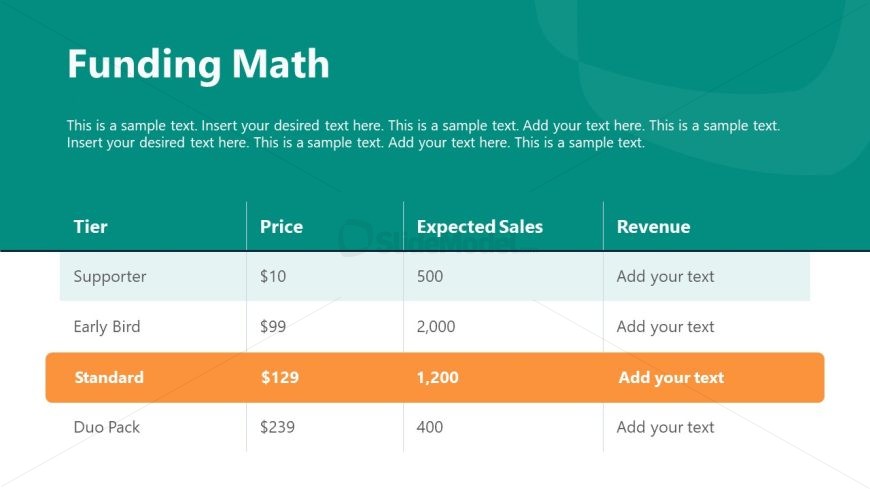
The Funding Math Table slide from the Crowdfunding Campaign Plan PowerPoint Template offers a structured comparison table ideal for financial summaries in funding presentations. This slide layout supports clear visualization of funding tiers, prices, expected sales, and revenue, making it a practical choice for investment pitches and business presentations requiring detailed financial breakdowns. Its editable shapes and organized design enhance the effectiveness of slide decks focused on crowdfunding strategies.
What’s on This Slide
The slide features a table positioned centrally, with a teal background. It includes four rows for different funding tiers: Supporter, Early Bird, Standard, and Duo Pack. Each row contains three columns labeled Tier, Price, Expected Sales, and Revenue. The Standard tier is highlighted with an orange background for emphasis. Text placeholders are present for each cell, indicating where to insert specific data. The title Funding Math is located at the top, aligned left, with a subtitle below it. The overall layout is structured and organized for clarity.
How to Use It
This layout functions as a comparison table, ideal for presenting funding tiers and their respective financial metrics. It fits within a presentation sequence that discusses financial projections or funding strategies. This format is useful in business scenarios where clear financial breakdowns are necessary, such as in fundraising pitches or investment discussions. It allows stakeholders to quickly assess potential revenue from different funding options.
Text Placeholders & Capacity
Keep your copy within these limits so it fits without resizing. Node body slots can accommodate tight text, roughly 8 words each.
| Placeholder | Count | Max characters (approx.) |
|---|---|---|
| Slide title | 1 | 30 |
| Item heading | 4 | 20 |
| Item body | 12 | 10 |
| Node number | 4 | 10 |
Slide Keywords
Download unlimited PowerPoint templates, charts and graphics for your presentations with our annual plan.
DOWNLOAD