Slide 3 of 3 from Crossing the Chasm Segment Selection
Crossing the Chasm Segment Selection PPT Slide
Customer Experience Matrix for Market Segmentation
- Table
- Comparison Table
- Strategic Analysis Slide
- 16:9
- 100% Editable
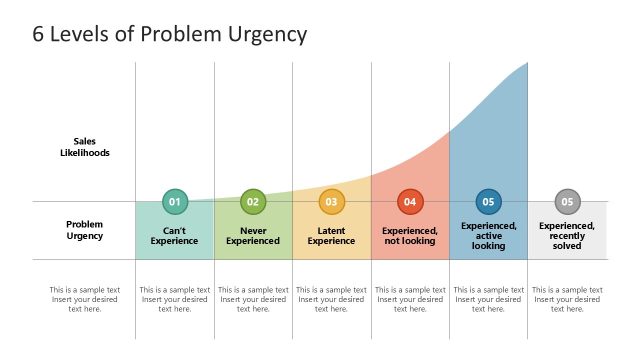
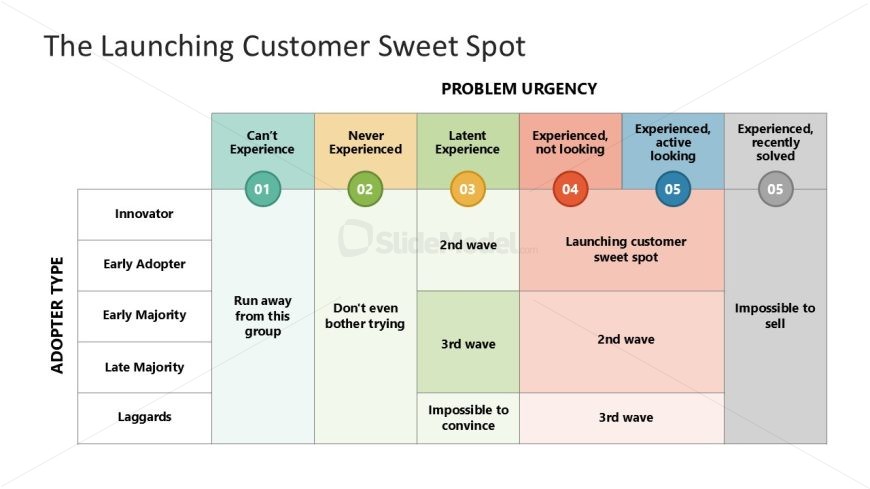
The Customer Experience Matrix slide from the Crossing the Chasm Segment Selection template offers a structured table layout ideal for market segmentation analysis and customer experience mapping. This slide's editable shapes and clear grid design support strategic business presentations by highlighting adopter types against problem urgency levels, making it a practical addition to pitch deck templates focused on product launch strategies.
What’s on This Slide
The layout features a matrix with five columns and five rows, creating a grid structure. The columns are labeled with varying levels of problem urgency, while the rows denote adopter types. Each cell contains text, with some cells highlighted in different colors to indicate significance. The top row has a bold title, and the overall visual hierarchy emphasizes the matrix's organization. Circular nodes are present in specific cells, indicating key points. Text placeholders exist for titles and descriptions, aligned centrally within their respective cells.
How to Use It
This matrix layout serves to categorize customer segments based on their experience and urgency regarding problems. It is useful for identifying target markets in a presentation about product launches or marketing strategies. This structure fits well after problem identification slides and before strategic recommendations. It can be applied in business scenarios such as market analysis, customer segmentation, and product positioning discussions.
Text Placeholders & Capacity
Keep your copy within these limits so it fits without resizing. Node body slots can hold about 4-5 words each.
| Placeholder | Count | Max characters (approx.) |
|---|---|---|
| Slide title | 1 | 40 |
| Item body | 25 | 30 |
Slide Keywords
Download unlimited PowerPoint templates, charts and graphics for your presentations with our annual plan.
DOWNLOADReturn to Crossing the Chasm Segment Selection.