Slide 2 of 3 from Crossing the Chasm Segment Selection
Customizable Crossing the Chasm Segment Selection Template
6 Levels of Problem Urgency Chart
- Chart
- Area Chart
- Strategic Analysis Slide
- 16:9
- 100% Editable
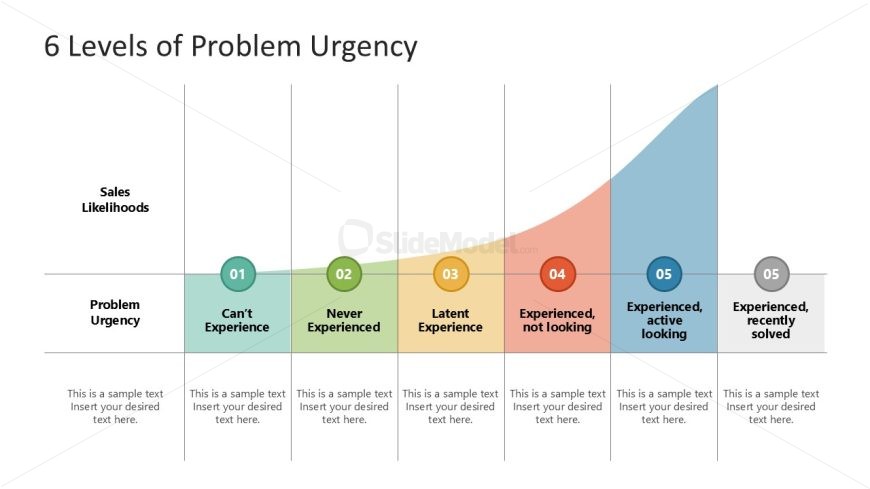
The 6 Levels of Problem Urgency slide from the Crossing the Chasm Segment Selection template uses a curved area chart to visually analyze customer urgency and sales likelihoods. This slide layout is suited for business presentations focusing on market segmentation and sales strategy, featuring editable shapes and color-coded segments to clarify urgency levels. It supports strategic analysis by illustrating how problem urgency impacts sales potential, making it a valuable addition to pitch deck templates and corporate presentation slide decks.
What’s on This Slide
The layout features a curved area chart divided into six segments, each representing a level of problem urgency. The x-axis labels indicate 'Problem Urgency,' while the y-axis indicates 'Sales Likelihoods.' Each segment is color-coded, with labels positioned within the segments. Text placeholders are present below each segment for additional information, aligned centrally. The overall composition is structured to guide the viewer's understanding of urgency levels in relation to sales likelihoods, with a clear visual hierarchy established through color differentiation.
How to Use It
This layout serves as a visual representation of varying levels of problem urgency in relation to sales likelihoods. It fits within a presentation sequence that discusses market segmentation or customer insights. Ideal for business scenarios where understanding customer urgency is crucial, such as product launches or marketing strategies. It can be used to illustrate customer behavior patterns and inform decision-making processes in sales and marketing contexts.
Text Placeholders & Capacity
Keep your copy within these limits so it fits without resizing. Node labels can hold up to 30 characters each, while body text slots can accommodate 50 characters each.
| Placeholder | Count | Max characters (approx.) |
|---|---|---|
| Item heading | 6 | 30 |
| Body paragraph | 6 | 50 |
Slide Keywords
Download unlimited PowerPoint templates, charts and graphics for your presentations with our annual plan.
DOWNLOADReturn to Crossing the Chasm Segment Selection.