Slide 2 of 3 from Corporate Process Map Template for PowerPoint
Customizable Corporate Process Map PowerPoint Slide
Corporate Process Flow Diagram for Business
- Diagram
- Process Flow
- Process Slide
- 16:9
- 100% Editable
What’s on This Slide
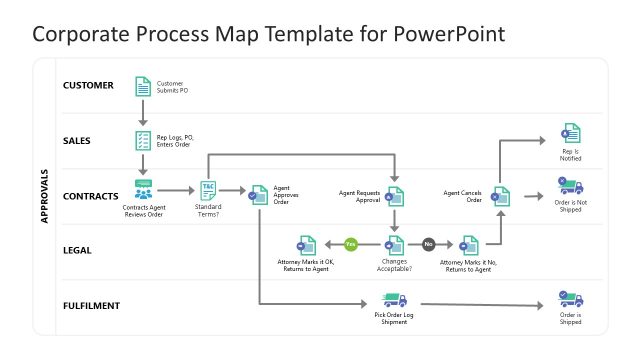
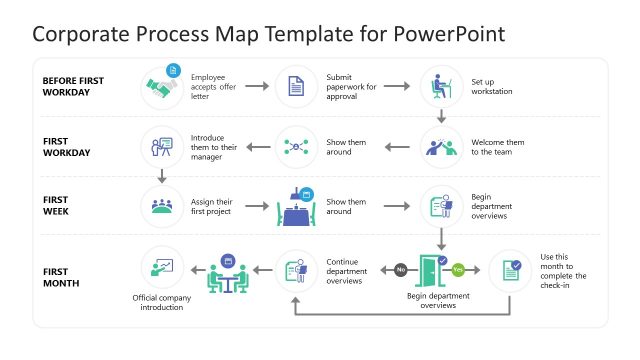
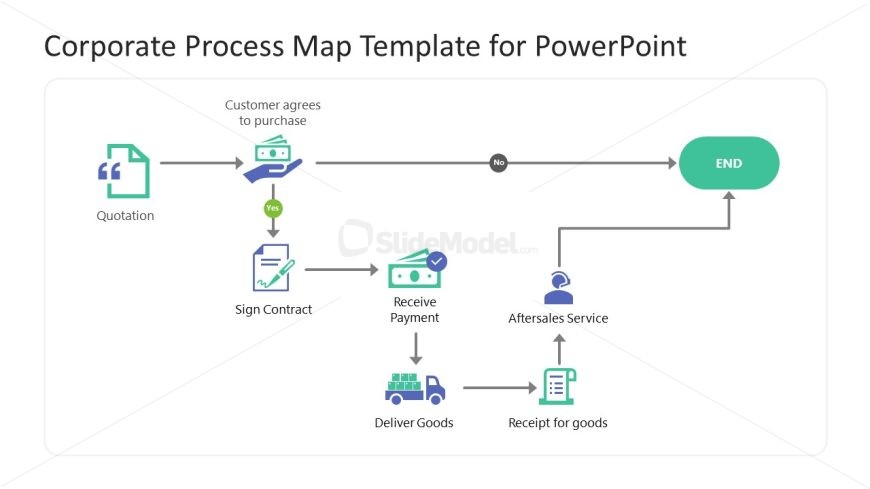
The layout features a horizontal flowchart with various shapes and icons. It begins with a quotation box on the left, leading to a decision point labeled 'Customer agrees to purchase.' A 'Yes' path leads to a contract signing icon, while a 'No' path leads to an 'END' shape. Below, a sequence includes icons for receiving payment, delivering goods, and providing aftersales service, culminating in a receipt for goods. Text placeholders are present for labels and descriptions, aligned with their respective icons, maintaining a clear visual hierarchy.
How to Use It
This layout serves as a process flow diagram, illustrating steps in a business transaction. It fits well in presentations that outline workflows or customer journey processes. Suitable scenarios include sales processes, service delivery workflows, or project management steps. This slide can effectively communicate sequential actions and decision points, guiding audiences through complex procedures in a clear manner.
Text Placeholders & Capacity
Keep your copy within these limits so it fits without resizing. Node labels can hold around 5-7 words each.
| Placeholder | Count | Max characters (approx.) |
|---|---|---|
| Item heading | 6 | 30 |
| Chart title | 1 | 50 |
Slide Keywords
Download unlimited PowerPoint templates, charts and graphics for your presentations with our annual plan.
DOWNLOAD