Slide 9 of 11 from Brainstorming & Creativity Session PowerPoint Template
Evaluate and Prioritize Ideas for Selection Slide
Evaluate & Prioritize Slide for Brainstorming Session
- Table
- Data Table
- Evaluation Slide
- 16:9
- 100% Editable
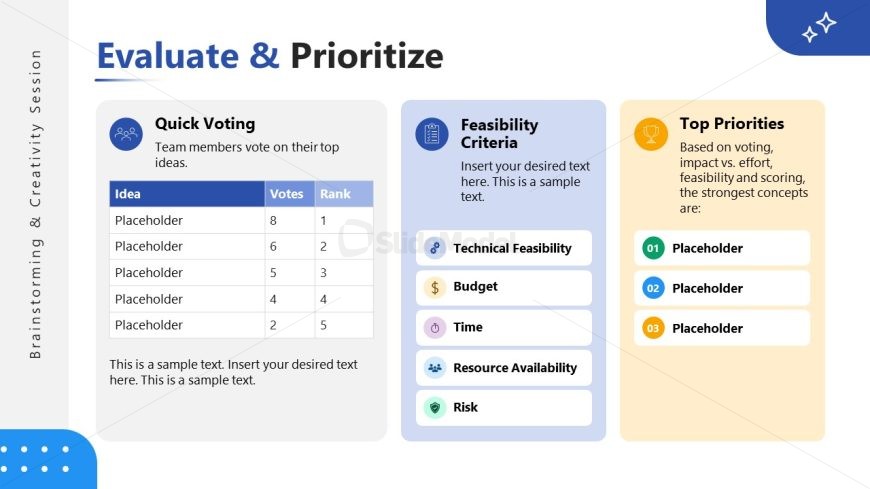
The Evaluate & Prioritize slide from the Brainstorming & Creativity Session PowerPoint Template offers a structured layout to assess ideas and rank projects effectively. This slide template features editable shapes and vector icons to highlight voting outcomes and feasibility criteria, supporting clear decision-making in business presentations or pitch deck templates.
What’s on This Slide
The layout features three distinct sections arranged horizontally. The left section contains a table labeled 'Quick Voting' with columns for 'Idea,' 'Votes,' and 'Rank,' showcasing five rows of placeholder text. The center section, titled 'Feasibility Criteria,' includes a list of criteria with accompanying icons. The right section, 'Top Priorities,' presents a ranked list of three placeholders. Each section is visually separated with varying background colors and icons, enhancing the hierarchy and clarity of information. Text placeholders are aligned centrally within their respective sections.
How to Use It
This layout serves to evaluate and prioritize ideas generated during brainstorming sessions. It fits within a presentation sequence that includes idea generation and clustering. This slide is useful in scenarios where teams need to assess ideas based on voting results and feasibility criteria. It can be used in project planning, product development discussions, or strategic decision-making meetings to visualize priorities effectively.
Text Placeholders & Capacity
Keep your copy within these limits so it fits without resizing. Body slots can accommodate about 15 words each.
| Placeholder | Count | Max characters (approx.) |
|---|---|---|
| Slide title | 1 | 30 |
| Item heading | 3 | 20 |
| Item body | 5 | 15 |
| Body paragraph | 1 | 150 |
Slide Keywords
Download unlimited PowerPoint templates, charts and graphics for your presentations with our annual plan.
DOWNLOADReturn to Brainstorming & Creativity Session PowerPoint Template.