Slide 7 of 11 from Brainstorming & Creativity Session PowerPoint Template
Brainstorming Techniques for Generating Ideas PPT Template
Brainstorming Techniques Slide Overview
- Diagram
- Circular Cycle
- Concept Explanation Slide
- 16:9
- 100% Editable
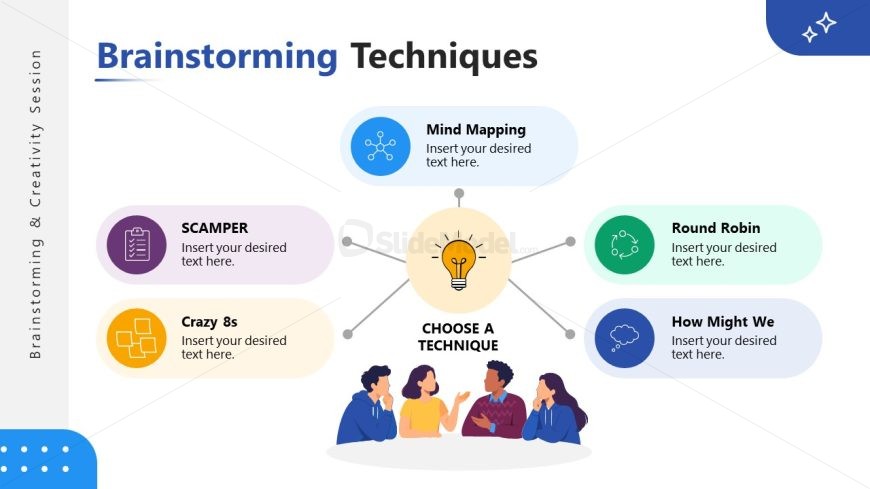
The Brainstorming Techniques slide from the Brainstorming & Creativity Session PowerPoint Template offers a circular diagram layout ideal for illustrating various creative methods. This slide integrates editable shapes and vector icons to visually organize brainstorming strategies like SCAMPER and Mind Mapping, enhancing corporate presentations or pitch deck templates focused on idea generation and group collaboration.
What’s on This Slide
The layout features a central light bulb icon surrounded by six labeled shapes. The shapes are positioned in a circular arrangement, with three on the left and three on the right. Each shape contains a placeholder for text, with labels such as 'SCAMPER' and 'Mind Mapping.' The title 'Brainstorming Techniques' is prominently displayed at the top, while a subtitle placeholder is located below. The background includes a light color scheme with accents of blue and purple. The overall composition emphasizes the central idea and its related techniques.
How to Use It
This layout serves as a visual guide for presenting various brainstorming techniques. It fits within a presentation sequence that discusses creative processes or idea generation. Suitable for workshops or team meetings, it can help facilitate discussions around different methods. The central focus encourages audience engagement, making it ideal for interactive sessions. Use this slide to introduce or summarize brainstorming strategies effectively.
Text Placeholders & Capacity
Keep your copy within these limits so it fits without resizing. Node labels can accommodate roughly 3-5 words each.
| Placeholder | Count | Max characters (approx.) |
|---|---|---|
| Slide title | 1 | 30 |
| Item heading | 6 | 20 |
| Item body | 6 | 40 |
Slide Keywords
Download unlimited PowerPoint templates, charts and graphics for your presentations with our annual plan.
DOWNLOADReturn to Brainstorming & Creativity Session PowerPoint Template.