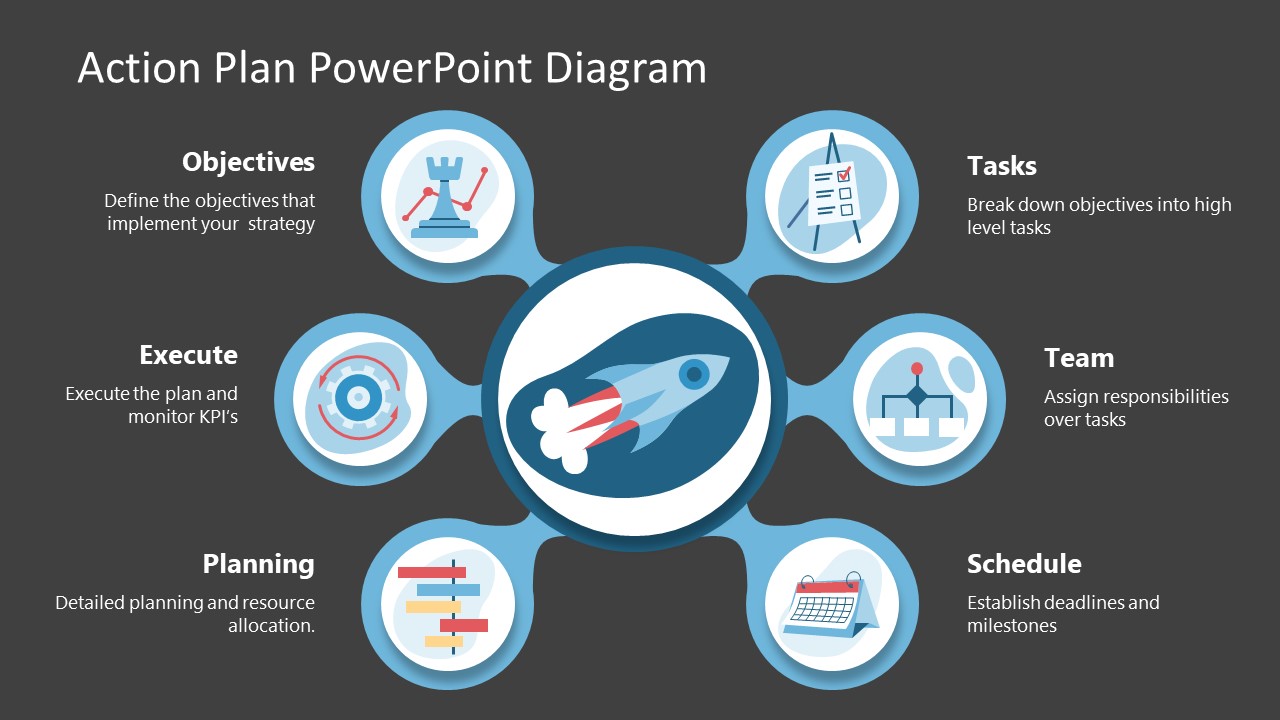
The Action Plan PowerPoint Diagram is a modern template for goal presentations. It is a 6 steps fluid diagram containing clipart shapes to represent action report items. These items are six components to help prepare an effective action plan. Professionals in all fields and industries can take advantage of a 1-slide action plan template to outline necessary elements. The six components of action plan process are task, team, schedule, planning, execute, and objectives. These components outline the who, who, when, where, and why of the goal. The Action plan template diagram is useful for business use of strategic planning. However, it also assists individuals in planning personal or career goals.
The Action Plan PowerPoint Diagram is a collection of flat fresh creative icons to represent six elements. As a part of a business presentation, the template can demonstrate all aspects of plans, timelines, and objectives. One slide PowerPoint action plan template enables audience to gather essential information about the plan. The visual aid helps understand the relationship among each factor at the same time.
Save time on the planning presentation by displaying key elements of the process on Action Plan Diagram Template. In project planning, for example, an action plan report presentation shows your approach to complete a project. Use the task section to brainstorm ideas and identify tasks. The team segment is where you can analyze and delegate tasks to the team members. Schedule the task and resources timeline before execution to meet the set objectives.
There are two slide options available for the action plan diagram. Users can select the desired PowerPoint theme to incorporate in their existing planning presentation. The clipart icons are a graphic representation of tasks, team, schedule, planning, execution, and objectives. These icons provide visual meaning to the contents of each section of the fluid diagram.
What’s inside this template
Example presentation scenarios
- A project manager can use the six-step fluid diagram in a kickoff meeting to align the team on objectives, task breakdown, owners, schedule, planning needs, and execution monitoring.
- A strategy consultant can use the rocket-centered action plan diagram to summarize how a client initiative moves from defined objectives to assigned responsibilities and measurable execution.
- A team lead can present the light or dark slide version during an internal planning session to assign work, confirm milestones, and connect each activity to the end goal.
- A workshop facilitator can use the six icon nodes as discussion prompts so participants define tasks, team roles, resource planning, deadlines, and KPI monitoring before committing to action.
Features
- 100% editable presentation template
- Compatible with Microsoft PowerPoint and Google Slides
- 16:9 aspect ratio slides
- Scalable vector shapes, icons and illustrations
- AI-Ready for Microsoft Copilot and Claude
- Instant access and download
Frequently asked questions
Q: How should a presenter explain the six action plan components without overcrowding the slide?
A: Introduce the central rocket first as the shared goal, then move around the six nodes in a consistent order. Keep each text block to one decision or action: what must be done, who owns it, when it happens, how it is planned, how it is executed, and how objectives are measured.
Q: Who is this action plan diagram best suited for?
A: This template fits presenters who need a one-screen planning summary rather than a long project document. Project managers, consultants, operations leads, and team supervisors can use it to align stakeholders on tasks, team ownership, schedules, resource planning, execution, and objectives before more detailed work begins.
Q: Why does the central rocket metaphor work for an action plan presentation?
A: The rocket gives the slide a clear destination cue, while the surrounding icons show the conditions needed for launch. This structure helps the audience see the plan as an integrated system: goals, tasks, people, timing, preparation, and execution all need to connect before progress can happen.



Action Plan PowerPoint Diagram
2-slide presentation template with six-step action plan diagram and goal planning icons.
Action Plan PowerPoint Diagram is a 2-slide action planning template for Microsoft PowerPoint and Google Slides. It shows a six-node fluid diagram around a central rocket icon, with labeled areas for objectives, tasks, team, schedule, planning, and execute. The deck is suited to project managers, team leads, and strategy presenters.
- Category
- Diagrams
- Rating


 Loading...
- Aspect ratio
- 16:9
- Item ID
- 8421-01
- Colors
 Microsoft PowerPoint
 Microsoft Copilot
 Claude for PowerPoint
Other formats supported
Subscribe today and get immediate
access to download our PowerPoint templates.