Slide 11 of 14 from Vision Strategy Transformation PowerPoint Template
Measures of Progress Presentation Slide Template
Measures of Progress Slide
- Text Layout
- List Blocks
- Evaluation Slide
- 16:9
- 100% Editable
The Measures of Progress slide from the Vision Strategy Transformation PowerPoint Template offers a structured way to display key performance metrics using editable shapes and vector icons. Ideal for business presentations and project updates, this slide layout supports clear communication of progress through concise numerical data and thematic visuals, enhancing any corporate presentation or pitch deck template.
What’s on This Slide
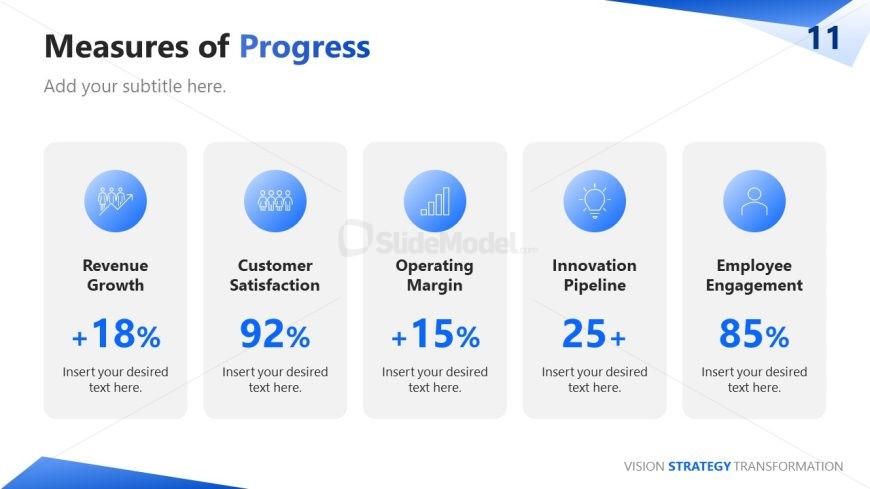
The layout features five rounded rectangular containers arranged horizontally across the slide. Each container contains an icon at the top, followed by a title and a percentage or numerical value. The icons include figures, a bar chart, a light bulb, and a person, all in blue. Text placeholders are present below each title for additional context. The background is predominantly white with a blue gradient in the top right corner. The visual hierarchy emphasizes the titles and values, with the icons providing a thematic connection to the metrics presented.
How to Use It
This layout serves to present key performance indicators in a clear and concise manner. It fits well in a presentation sequence after discussing strategic goals or objectives, summarizing progress against those goals. Suitable scenarios include quarterly business reviews, performance updates, or project status reports, where stakeholders need to quickly grasp essential metrics. The structure allows for easy comparison of multiple metrics at once, enhancing audience understanding.
Text Placeholders & Capacity
Keep your copy within these limits so it fits without resizing. Node labels can hold about 5 words each, while body text is tighter.
| Placeholder | Count | Max characters (approx.) |
|---|---|---|
| Slide title | 1 | 30 |
| Subtitle | 1 | 50 |
| Item heading | 5 | 25 |
| Item body | 5 | 10 |
Slide Keywords
Download unlimited PowerPoint templates, charts and graphics for your presentations with our annual plan.
DOWNLOADReturn to Vision Strategy Transformation PowerPoint Template.