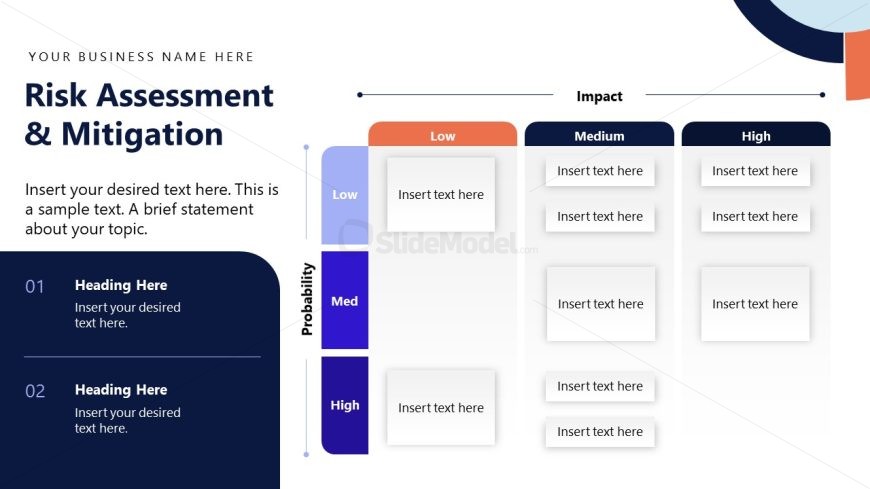
Slide 11 of 15 from Stakeholder Presentation PowerPoint Template
Stakeholder Presentation Slide with Matrix Diagram
Risk Assessment Matrix for Stakeholder Presentation
- Diagram
- Matrix Quadrant
- Risk Assessment Slide
- 16:9
- 100% Editable
The Risk Assessment Matrix slide from the Stakeholder Presentation PowerPoint Template provides a clear visual tool for categorizing risks by probability and impact. This editable slide layout supports risk management discussions and project evaluations, making it suitable for corporate presentations and stakeholder meetings. Its design integrates vector icons and editable shapes to enhance clarity within business presentation slide decks.
What’s on This Slide
The layout features a risk assessment matrix with two axes: Probability and Impact. The left side lists three probability levels: Low, Medium, and High, arranged vertically. The top displays three impact levels: Low, Medium, and High, arranged horizontally. Each cell in the matrix is a placeholder for text, with the cell sizes being uniform. The title is prominently positioned at the top, with a subtitle below it. There are additional text placeholders for headings and descriptive text on the left side. The overall color scheme includes shades of blue and orange.
How to Use It
This layout serves as a risk assessment matrix, allowing users to categorize risks based on their probability and impact. It fits within a presentation sequence that addresses risk management or project evaluation. This structure is useful for project managers or stakeholders needing to visualize potential risks and their implications. It can be used in business scenarios such as project planning, strategic analysis, or stakeholder engagement discussions.
Text Placeholders & Capacity
Keep your copy within these limits so it fits without resizing. Node slots can accommodate concise text, roughly 5-8 words each.
| Placeholder | Count | Max characters (approx.) |
|---|---|---|
| Slide title | 1 | 30 |
| Subtitle | 1 | 60 |
| Item body | 9 | 30 |
| Heading | 2 | 30 |
Slide Keywords
Download unlimited PowerPoint templates, charts and graphics for your presentations with our annual plan.
DOWNLOADReturn to Stakeholder Presentation PowerPoint Template.