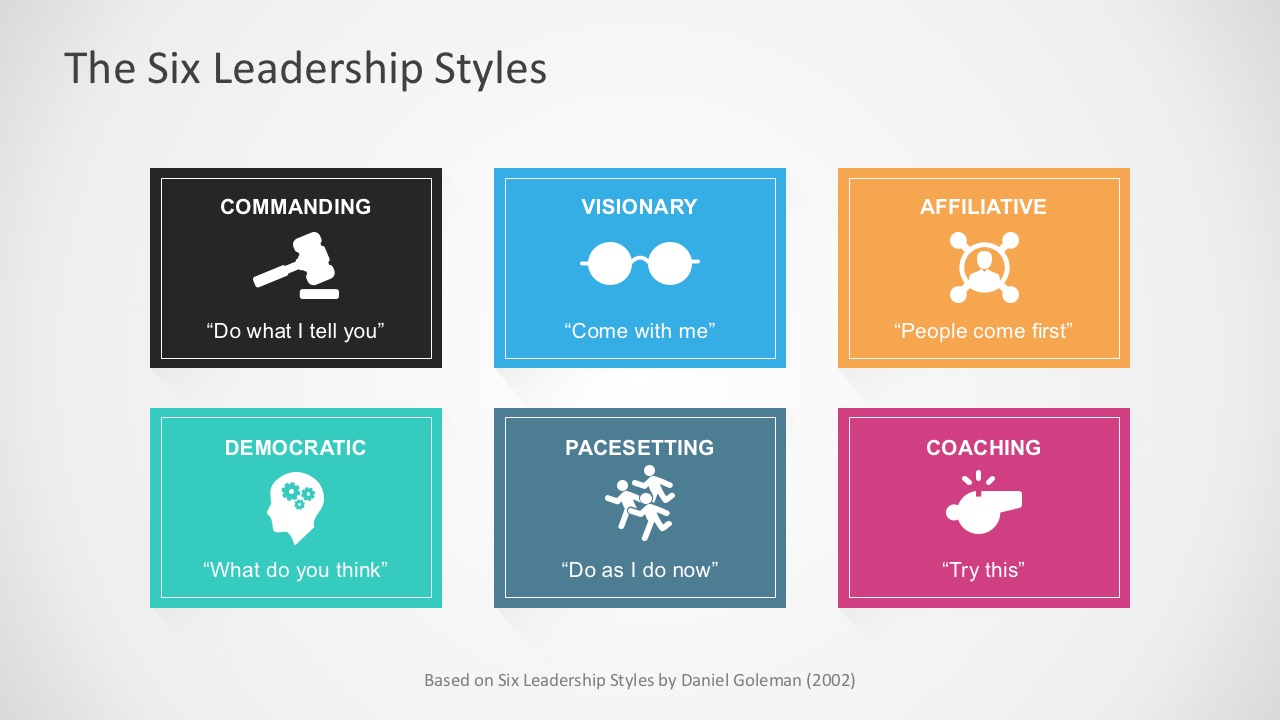
The Six Leadership Styles template for PowerPoint provides a visual representation of Daniel Goleman’s six leadership styles. The concept is beyond beneficial for project managers and business owners. It helps them create a brief analysis and directly correlate the leadership effects on people and situations. Likely, leaders need to be able to switch leadership approaches as the context requires it.
The leadership template has seven (7) slides. Each slide depicts the leadership style designed in beautifully created colored charts. The high-quality editable PowerPoint elements suit the template for corporate demonstrations.
Here are the Six Leadership Styles of Daniel Goleman’s model:
- Commanding demands immediate compliance. This style works best in a crisis or with problematic people.
- Visionary mobilizes people toward a vision. This style works best when a clear direction or change is needed.
- Affiliative creates emotional bonds and harmony. This style works best to heal team rifts or motivate people in stressful times.
- Democratic builds consensus through participation. This style works best to create harmony or get input.
- Pacesetting expects excellence and self-direction. This style works best to get quick results from a highly competent team.
- Coaching develops people for the future. This style works best when helping people and building long-term strength.
Six Leadership Styles for PowerPoint breaks down the leadership style that fits a different situation. Check more leadership PowerPoint Templates in the gallery. Alternatively, you can download other leadership 6 by 6 template designs for PowerPoint and Google Slides.
What’s inside this template
Example presentation scenarios
- An HR facilitator can use the overview card grid to introduce the six styles before asking new managers to identify the approaches they use most often.
- A leadership coach can present the paired icon-and-explanation slides to compare Commanding, Visionary, and Coaching behaviors in real workplace conversations.
- A project manager can use the Democratic and Pacesetting slides to discuss how participation and speed affect team decision-making during delivery work.
- A management consultant can use the color-coded style panels to frame a client workshop on social intelligence, emotional intelligence, and people management habits.
Features
- 100% editable presentation template
- Compatible with Microsoft PowerPoint and Google Slides
- 16:9 aspect ratio slides
- Scalable vector shapes, icons and illustrations
- AI-Ready for Microsoft Copilot and Claude
- Instant access and download
Frequently asked questions
Q: How should I present the six styles without making the session feel like a list?
A: Start with Slide 1 as a map, not a reading slide. Ask the audience which style they recognize first, then move into the individual detail slides only where discussion is needed. The repeated icon-and-explanation format helps keep each style comparable while leaving room for examples, risks, and situational fit.
Q: Who is this template best suited for in a leadership conversation?
A: This template fits HR teams, managers, coaches, and consultants who need to explain leadership behavior in a practical way. It works well when the goal is to help leaders recognize when Commanding, Visionary, Affiliative, Democratic, Pacesetting, or Coaching behavior may fit a team situation.
Q: Why does each leadership style use a separate color panel and icon?
A: The colors and icons create memory anchors for six abstract behavior patterns. A gavel-like icon cues Commanding, a group icon cues Pacesetting, and a whistle icon cues Coaching. This visual separation reduces confusion and lets the presenter compare leadership modes without relying only on text-heavy definitions.


Six Leadership Styles Template for PowerPoint
7-slide presentation template for leadership styles, coaching conversations, and Goleman management training.
The Six Leadership Styles Template for PowerPoint is a 7-slide leadership presentation template explaining Daniel Goleman's model through an overview card grid and six paired icon-and-explanation slides. It covers Commanding, Visionary, Affiliative, Democratic, Pacesetting, and Coaching styles for managers, trainers, and HR teams in Microsoft PowerPoint and Google Slides.
- Category
- Business PowerPoint Templates
- Rating


 Loading...
- Aspect ratio
- 16:9
- Item ID
- 7292-02
- Colors
 Microsoft PowerPoint
 Microsoft Copilot
 Claude for PowerPoint
Other formats supported
Subscribe today and get immediate
access to download our PowerPoint templates.


