Slide 6 of 12 from Physical AI PowerPoint Template
How it Works – Physical AI Slide PPT Layout
How Physical AI Works Overview Slide
- Diagram
- Comparison Split
- Process Slide
- 16:9
- 100% Editable
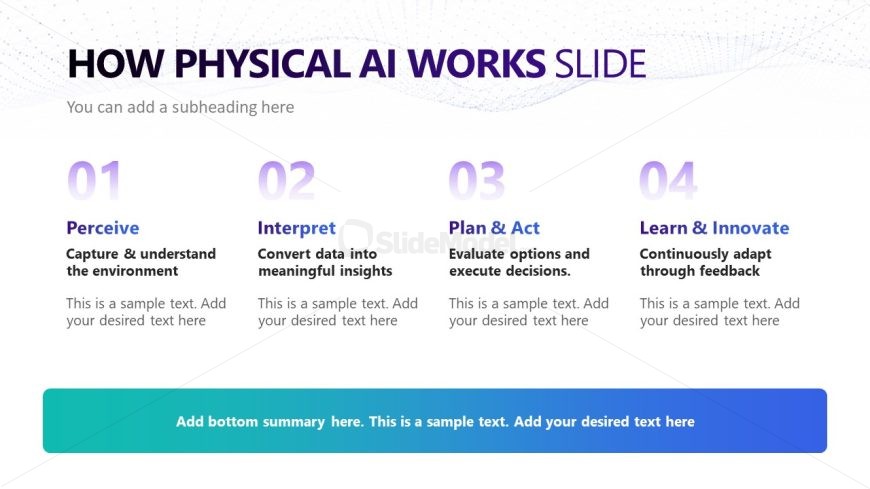
The How Physical AI Works slide from the Physical AI PowerPoint Template offers a clear, step-by-step process layout ideal for business presentations and training sessions. Featuring four horizontal columns with numbered steps, this slide template helps explain complex methodologies with editable shapes and vector icons, enhancing clarity in corporate presentations and pitch decks.
What’s on This Slide
The layout features four equally sized columns arranged horizontally across the slide. Each column contains a numbered label at the top, followed by a title and a brief description. The first column is labeled '01' with the title 'Perceive,' the second '02' with 'Interpret,' the third '03' with 'Plan & Act,' and the fourth '04' with 'Learn & Innovate.' Below the columns, there is a wide rectangular placeholder for a summary text, aligned at the bottom. The background features a gradient from light to dark blue, enhancing visual separation.
How to Use It
This layout serves as a sequential overview of a process or framework, suitable for explaining steps in a methodology. It fits well after an introductory slide and before detailed content, providing a clear structure for presenting concepts. This format is useful in business contexts such as training sessions, strategy meetings, or educational presentations where a step-by-step approach is necessary to convey complex ideas effectively.
Text Placeholders & Capacity
Keep your copy within these limits so it fits without resizing. Node body slots can accommodate roughly 10-12 words each.
| Placeholder | Count | Max characters (approx.) |
|---|---|---|
| Slide title | 1 | 30 |
| Item heading | 4 | 15 |
| Item body | 4 | 60 |
| Callout | 1 | 80 |
Slide Keywords
Download unlimited PowerPoint templates, charts and graphics for your presentations with our annual plan.
DOWNLOADReturn to Physical AI PowerPoint Template.