Slide 12 of 14 from Field Service Management PowerPoint Templates
Field Service KPIs & Performance Dashboard – Field Service Management Deck
Field Service KPIs & Performance Dashboard Overview
- Chart
- Bar Horizontal
- Kpi Reporting Slide
- 16:9
- 100% Editable
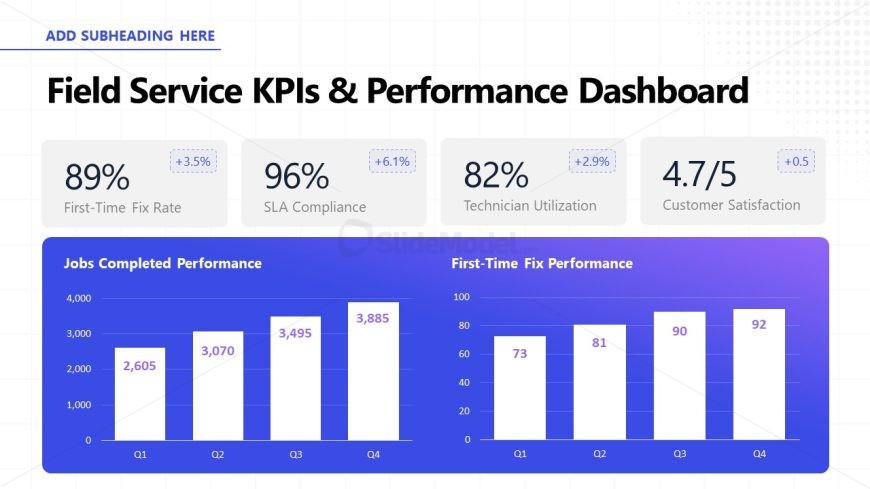
The Field Service KPIs & Performance Dashboard slide from the Field Service Management PowerPoint Templates offers a clear layout for presenting operational metrics. This slide layout combines editable shapes and bar charts to visualize quarterly job completion rates and first-time fix performance, making it suitable for business presentations focused on efficiency and KPI reporting within a corporate presentation or pitch deck template.
What’s on This Slide
The slide features a title at the top center stating 'Field Service KPIs & Performance Dashboard'. Below, four key performance indicators are displayed in a grid format, with two on the left and two on the right. Each KPI includes a percentage and a change indicator, with the text aligned centrally. Below these KPIs, two bar charts are presented side by side. The left chart shows 'Jobs Completed Performance' with values for four quarters, while the right chart illustrates 'First-Time Fix Performance' with corresponding percentages. The background is a light grid pattern, enhancing the visual hierarchy.
How to Use It
This layout serves as a performance dashboard, ideal for presenting key metrics in a concise manner. It fits well in a presentation sequence focused on evaluating field service operations, particularly after discussing challenges or strategies. This structure is useful for stakeholders needing to assess operational efficiency, technician performance, and customer satisfaction metrics in a business context. It is effective in quarterly reviews or performance assessments.
Text Placeholders & Capacity
Keep your copy within these limits so it fits without resizing. Node labels can hold about 2-3 words each, while body text is tighter.
| Placeholder | Count | Max characters (approx.) |
|---|---|---|
| Slide title | 1 | 40 |
| Item heading | 4 | 20 |
| Item body | 4 | 10 |
| Chart title | 2 | 30 |
| Data label | 8 | 5 |
Slide Keywords
Download unlimited PowerPoint templates, charts and graphics for your presentations with our annual plan.
DOWNLOAD