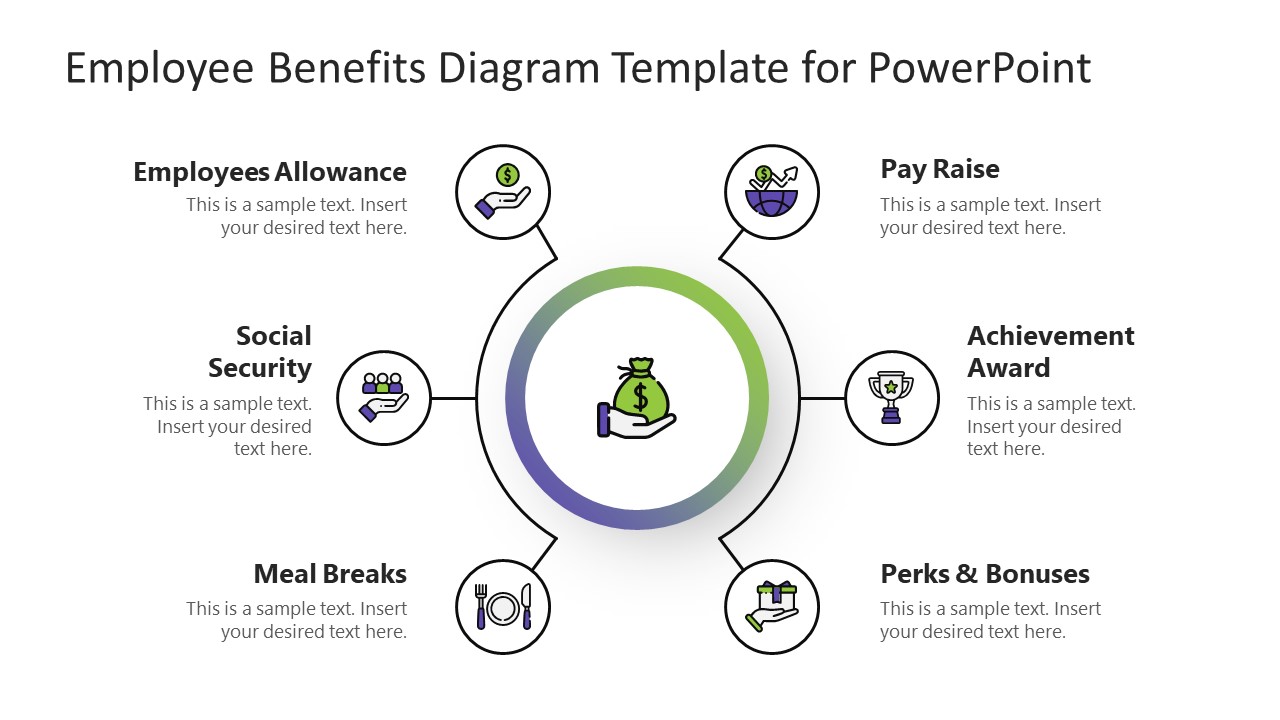
To portray a positive side of your organization to your employees, use Employee Benefits Diagram Template for PowerPoint. Employee retention is a significant concern of every organization; they provide employees benefits and perks to improve their working experience. This PowerPoint template is a standard employee benefits chart used in business presentations and corporate communications to inform their talent about current benefits.
The diagram displays six employee benefits organized in two semi-circles around the central circular shape. Each benefit is shown through an appropriate PowerPoint icon metaphor. For description, text boxes are also placed alongside each title. The benefits which are mentioned include:
- Pay Raise
- Employee Allowances
- Social Security
- Achievement Awards
- Meal Breaks
- Perks and Rewards
The purpose of communicating benefits and perks is essential to retain talent, and it also aims to portray a friendly image of a workplace. The employee benefits chart is usually presented at orientation events for new employees. The purpose of presenting this benefit chart is to show that the company is the best place to work for all employees. And this will, in turn, encourage them to work harder. For instance, the employees will work better to get bonuses and achievement awards.
Another use case of the Employee Benefits Diagram Template is presenting and discussing different benefits packages during the HR planning meeting. From time to time, employee benefits packages are re-evaluated and updated with new benefits or more targeted options for the different lifestyles existing in the organization.
The design of the Employee Benefits Diagram Template for PowerPoint is made attractive to get maximum audience engagement. There are two background color variations. Users can edit every feature of the object on the slides, like colors, font styles, and the arrangement of the elements in the canvas. The PowerPoint icons used for every employee benefit are also changeable. Presenters can use the animations tool of PowerPoint to make it more engaging. Alternatively, check our complete collection of human resources PowerPoint templates.
What’s inside this template
Example presentation scenarios
- An HR manager can use the circular benefits diagram during new hire orientation to introduce pay raises, allowances, social security, meal breaks, achievement awards, and bonuses in one view.
- A people operations lead can present the icon callouts in a benefits review meeting to compare which perks should be kept, renamed, or expanded for employees.
- An internal communications team can use the dark-background version for an all-hands update that explains current rewards and workplace support programs.
- A department leader can use the six description boxes to connect employee perks with retention goals during a workforce planning discussion.
Features
- 100% editable presentation template
- Compatible with Microsoft PowerPoint and Google Slides
- 16:9 aspect ratio slides
- Scalable vector shapes, icons and illustrations
- AI-Ready for Microsoft Copilot and Claude
- Instant access and download
Frequently asked questions
Q: How should a presenter explain the benefits without making the slide feel like a list?
A: Start with the center money icon as the core value promise, then move around the circle in a deliberate order. Group related ideas verbally, such as financial support, daily work experience, and recognition. Keep each description box to one short proof point so the audience sees the benefit categories before reading details.
Q: Who is this template best suited for in an HR presentation?
A: This template fits HR, people operations, and internal communications teams that need a quick benefits overview for employees or managers. It works best when the goal is awareness, orientation, or package discussion. The six-callout structure is less suited to policy detail and better for showing the main categories employees should remember.
Q: Why does the circular benefits layout help communicate employee value?
A: The circular structure presents benefits as a connected employee value system rather than isolated perks. The central compensation icon anchors the message, while the surrounding icons act as memory cues for allowance, pay, security, meals, awards, and bonuses. This makes the slide easier to scan and supports a balanced discussion across categories.

Employee Benefits Diagram Template for PowerPoint
2-slide employee benefits presentation template with HR perks diagram and icon callouts
The Employee Benefits Diagram Template for PowerPoint is a 2-slide 16:9 HR diagram set for explaining workplace perks. It uses a circular hub-and-spoke employee benefits diagram with six icon callouts, a central compensation metaphor, and short text descriptions. HR teams can present orientation, retention, or planning messages in Microsoft PowerPoint and Google Slides.
- Category
- Business PowerPoint Templates
- Rating

 Loading...
- Aspect ratio
- 16:9
- Item ID
- 21276-01
- Colors
 Microsoft PowerPoint
 Microsoft Copilot
 Claude for PowerPoint
Other formats supported
Subscribe today and get immediate
access to download our PowerPoint templates.