Slide 1 of 1 from Customer Journey Diagram PowerPoint Template
Customer Journey PowerPoint Diagram
Customer Journey Diagram Overview
- Diagram
- Timeline Horizontal
- Customer Journey Slide
- 16:9
- 100% Editable
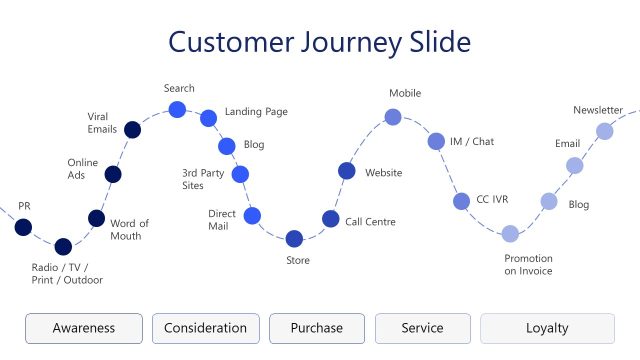
The Customer Journey Diagram slide from the Customer Journey Diagram PowerPoint Template provides a clear horizontal timeline to map user interactions and engagement strategies. This slide layout uses editable shapes and vector icons to visually represent key customer touchpoints and stages, making it suitable for corporate presentations focused on customer experience and marketing analysis. It integrates well into business presentation slide decks aiming to enhance understanding of customer engagement flows.
What’s on This Slide
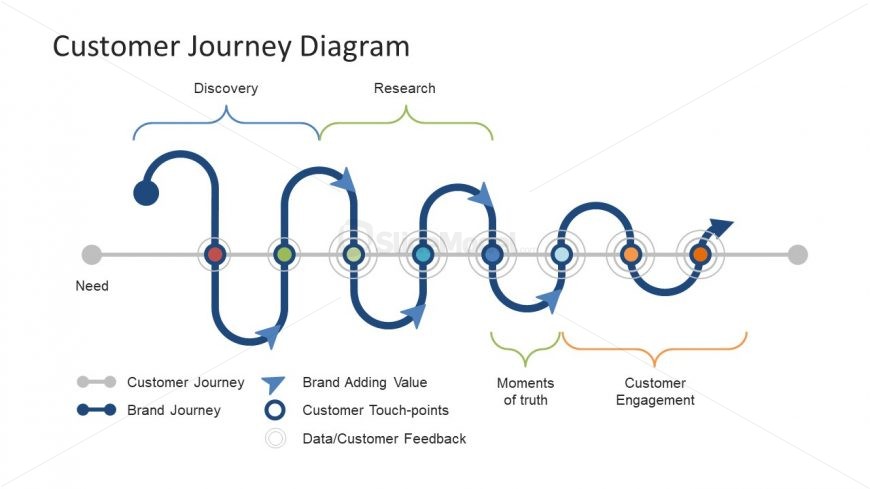
The slide features a customer journey diagram with a wavy line representing the journey stages. Key stages are labeled at the top, including 'Discovery' and 'Research.' Circular nodes represent customer touchpoints, with varying colors indicating different aspects like 'Brand Adding Value' and 'Customer Engagement.' The diagram includes directional arrows to indicate flow and connection between stages. Text placeholders are present for titles and labels, aligned at the top and bottom. The overall layout is horizontal, emphasizing the progression through the customer journey.
How to Use It
This layout serves as a visual representation of the customer journey, ideal for illustrating stages and touchpoints in a presentation. It fits well after problem identification slides, providing clarity on customer interactions. Use this structure to discuss customer experience strategies, highlight engagement moments, or present research findings. It is suitable for marketing, product development, or customer service discussions, helping stakeholders understand the customer perspective and improve service delivery.
Text Placeholders & Capacity
Keep your copy within these limits so it fits without resizing. Node labels can accommodate roughly 20 characters each.
| Placeholder | Count | Max characters (approx.) |
|---|---|---|
| Slide title | 1 | 30 |
| Item heading | 6 | 20 |
Slide Keywords
Download unlimited PowerPoint templates, charts and graphics for your presentations with our annual plan.
DOWNLOADReturn to Customer Journey Diagram PowerPoint Template.