Slide 7 of 13 from Client Onboarding PowerPoint Template
Timeline Slide for PowerPoint – Client Onboarding PPT Template
Client Onboarding Project Timeline Slide
- Diagram
- Timeline Horizontal
- Process Slide
- 16:9
- 100% Editable
The Project Timeline Overview slide from the Client Onboarding PowerPoint Template offers a clear horizontal timeline layout ideal for business presentations. It visually segments project phases across weeks, making it suitable for project management and client onboarding slide decks. This slide template includes editable shapes and text placeholders, supporting customization for detailed process overviews within corporate presentations or pitch deck templates.
What’s on This Slide
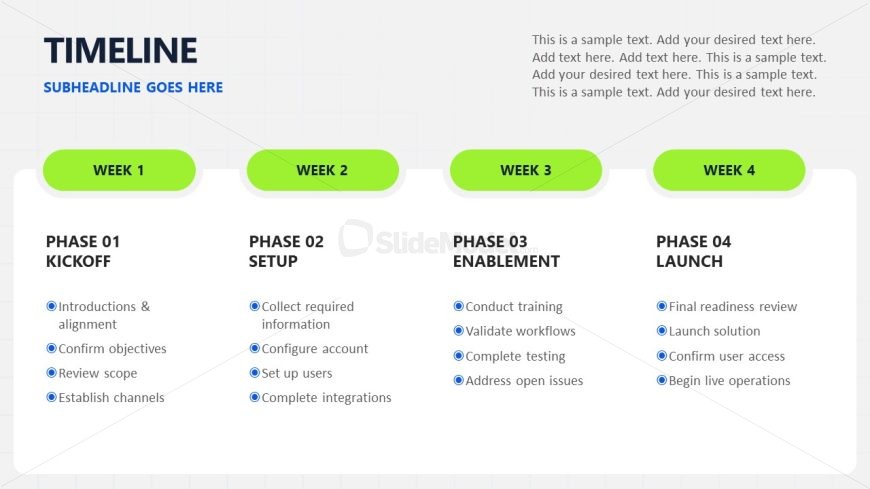
The slide features a horizontal timeline layout divided into four segments labeled Week 1, Week 2, Week 3, and Week 4. Each segment contains a phase title, such as Phase 01 Kickoff, Phase 02 Setup, Phase 03 Enablement, and Phase 04 Launch, positioned at the top of each section. Below the titles, there are bullet points outlining specific tasks for each phase. The sections are visually separated by rounded shapes with a green background. Text placeholders are present for the main title and subheadline at the top, with a larger font for the title and smaller for the subheadline.
How to Use It
This layout serves as a project timeline, effectively illustrating the phases of a client onboarding process. It fits within a presentation sequence after introducing the project context and before detailing specific roles or responsibilities. This structure is useful for project managers to communicate timelines and key activities to stakeholders. It can be applied in various business scenarios, such as onboarding clients, launching products, or managing project phases.
Text Placeholders & Capacity
Keep your copy within these limits so it fits without resizing. Node body slots can accommodate detailed descriptions, roughly 15-20 words each.
| Placeholder | Count | Max characters (approx.) |
|---|---|---|
| Slide title | 1 | 30 |
| Subtitle | 1 | 50 |
| Item heading | 4 | 20 |
| Item body | 4 | 100 |
Slide Keywords
Download unlimited PowerPoint templates, charts and graphics for your presentations with our annual plan.
DOWNLOADReturn to Client Onboarding PowerPoint Template.