Slide 2 of 2 from 5 Levers PowerPoint Template
Presentation of 5 Levers Template Diagram
Actionable Levers Diagram for Presentations
- Diagram
- Other
- Strategy Slide
- 16:9
- 100% Editable
What’s on This Slide
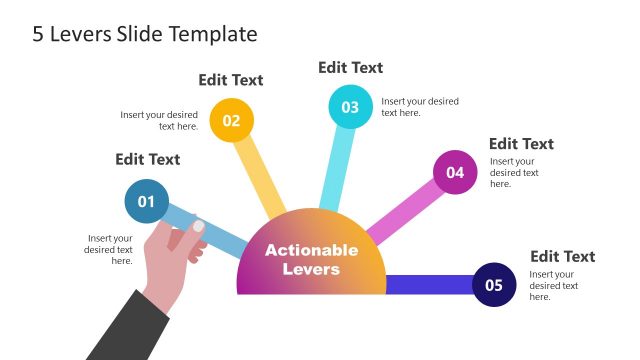
The layout features a central circular shape labeled 'Actionable Levers' at the bottom center. Five colorful lever shapes extend outward from the circle, each pointing to a text placeholder. The levers are arranged in a fan-like manner, with the first lever on the left and the fifth on the right. Each lever has a number label positioned above it, indicating its sequence. Text placeholders are aligned above each lever, with a consistent font size. A hand graphic is shown on the left side, gripping the central circle. The background is a dark gray color.
How to Use It
This layout serves as a visual representation of five distinct levers or steps in a process. It is suitable for presentations that aim to explain strategies, actions, or components that drive results. It fits well after a problem statement slide, providing a clear transition to actionable solutions. This structure is useful in business contexts such as project planning, strategic initiatives, or operational improvements, where clarity in presenting multiple components is essential.
Text Placeholders & Capacity
Keep your copy within these limits so it fits without resizing. Node body slots are tight, roughly 10 words each.
| Placeholder | Count | Max characters (approx.) |
|---|---|---|
| Item heading | 5 | 30 |
| Item body | 5 | 50 |
| Slide title | 1 | 40 |
Slide Keywords
Download unlimited PowerPoint templates, charts and graphics for your presentations with our annual plan.
DOWNLOADReturn to 5 Levers PowerPoint Template.