2-Option Diagram Infographic PowerPoint Template
Showcase contrasting information between two ideas or initiatives in the meetups using our 2-Option Diagram Infographic PowerPoint Template. This options diagram template includes fully customizable components that users can edit to suit their needs. They can also customize it with Google Slides. This single-slide template helps project managers highlight the two main phases of the project lifecycle. Before launching a new marketing campaign, marketers can discuss the two campaign objectives that can help their brand grow or boost sales. Users can also demonstrate the two business models aimed at achieving an innovative outcome. In problem-solving sessions or root-cause analysis presentations, professionals can use this template to present two solutions to eliminate the problem’s root cause. Some of the additional use cases of this template are:
- Tech experts can discuss the two types of innovative implementations to boost business growth.
- Scholars, mentors, and trainers can use our 2-option diagram template to present two ways of personal development.
- In strategy planning sessions, our template allows users to present two types of inbound or outbound strategies for the company.
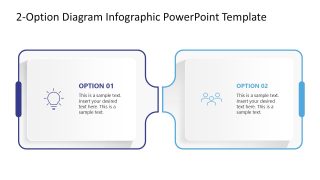
The 2-Option Diagram Infographic PowerPoint Template features a modern diagram of two square boxes placed adjacent to each other. On the inner sides, they have small curved ends that connect the two blocks. Each box has a colored outline, an infographic icon, an option heading, and placeholder text for description presentation. Users can change the infographics based on the topic of discussion. Also, you can modify the fonts of text placeholders to match your specific theme needs.
Download the 2-option diagram template for business meetings and edit it to showcase your ideas clearly! Alternatively, you can download other infographic PPT slides and comparison slide templates for PowerPoint & Google Slides presentations, including comparison tables, side by side layouts, A vs B slides and more.

You must be logged in to download this file.
DOWNLOAD- Category
- Diagrams
- Rating

 Loading...
- Size
- 16x9
- Item ID
- 23383-01
- Colors
Subscribe today and get immediate
access to download our PowerPoint templates.