Slide 2 of 2 from 10-Step Circular Arrow PowerPoint Template
Editable 10-Step Circular Arrow PPT Template
10 Steps Circular Arrow Diagram for Presentations
- Diagram
- Circular Cycle
- Process Slide
- 16:9
- 100% Editable
What’s on This Slide
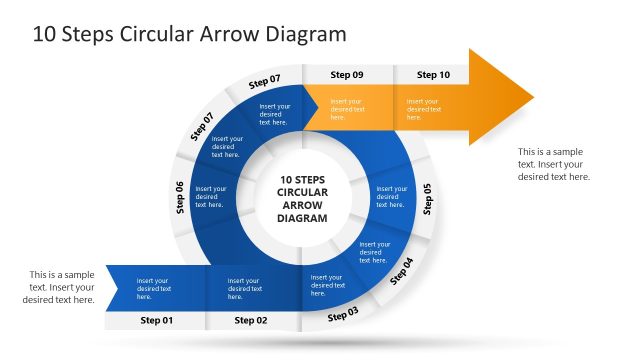
The layout features a circular arrow diagram positioned centrally on a dark blue background. The diagram contains ten segments labeled 'Step 01' to 'Step 10', arranged in a clockwise direction. Each segment has a placeholder for text, with the first five segments on the outer circle and the last five on a horizontal band extending to the right. An arrow points outward from the last segment, indicating progression. There are additional text placeholders on the left and right sides for supplementary information.
How to Use It
This layout serves as a process flow diagram, ideal for illustrating sequential steps in a project or sales process. It fits well in a presentation sequence after introducing a problem or concept, providing a clear visual representation of steps. Suitable scenarios include project management discussions, sales strategy presentations, or training sessions where stepwise processes are emphasized. It effectively communicates the flow of tasks or stages in a structured manner.
Text Placeholders & Capacity
Keep your copy within these limits so it fits without resizing. Node labels can hold roughly 2-3 words each, while body text is more flexible.
| Placeholder | Count | Max characters (approx.) |
|---|---|---|
| Item heading | 10 | 20 |
| Body paragraph | 2 | 100 |
| Slide title | 1 | 40 |
Slide Keywords
Download unlimited PowerPoint templates, charts and graphics for your presentations with our annual plan.
DOWNLOADReturn to 10-Step Circular Arrow PowerPoint Template.