Slide 18 of 25 from 4# Calendar Timeline Toolkit
2021 Calendar Tasks Notes Slide Design
Calendar Notes Layout for Planning
- Text Layout
- List Blocks
- Goal Setting Slide
- 16:9
- 100% Editable
The Calendar Notes Layout from the 4# Calendar Timeline Toolkit template offers a practical slide design for daily scheduling and meeting planning. This slide template features editable shapes including a sticky note for jotting down key points alongside a clear two-column table for organizing time slots and event descriptions, making it a useful addition to any business presentation or corporate slide deck focused on time management.
What’s on This Slide
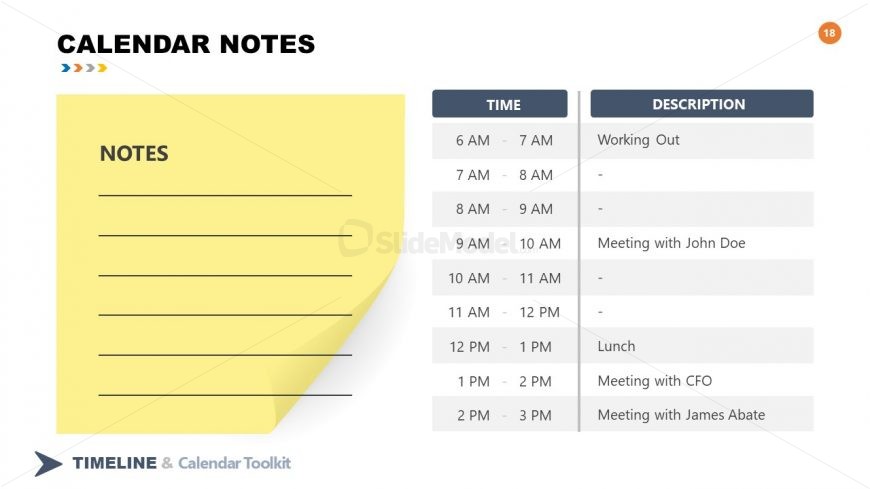
The layout features a yellow sticky note on the left side, where users can write notes. The note has a header labeled 'NOTES' and several horizontal lines for writing. To the right, there is a two-column table. The left column is labeled 'TIME' and contains time slots from 6 AM to 3 PM. The right column is labeled 'DESCRIPTION' and includes space for event details. The table has a clean, structured appearance, with alternating row colors for clarity. The overall design is simple and functional, emphasizing note-taking and scheduling.
How to Use It
This layout serves as a note-taking tool for scheduling events throughout the day. It is suitable for personal or professional contexts, allowing users to jot down appointments and tasks. This slide fits well in a presentation focused on time management or planning. It can be used in meetings, workshops, or training sessions where participants need to organize their schedules. The layout is effective for summarizing daily activities and ensuring important tasks are noted.
Text Placeholders & Capacity
Keep your copy within these limits so it fits without resizing. Node slots can hold approximately 30 characters each.
| Placeholder | Count | Max characters (approx.) |
|---|---|---|
| Slide title | 1 | 20 |
| Item heading | 8 | 10 |
| Item body | 8 | 30 |
Slide Keywords
Download unlimited PowerPoint templates, charts and graphics for your presentations with our annual plan.
DOWNLOADReturn to 4# Calendar Timeline Toolkit.