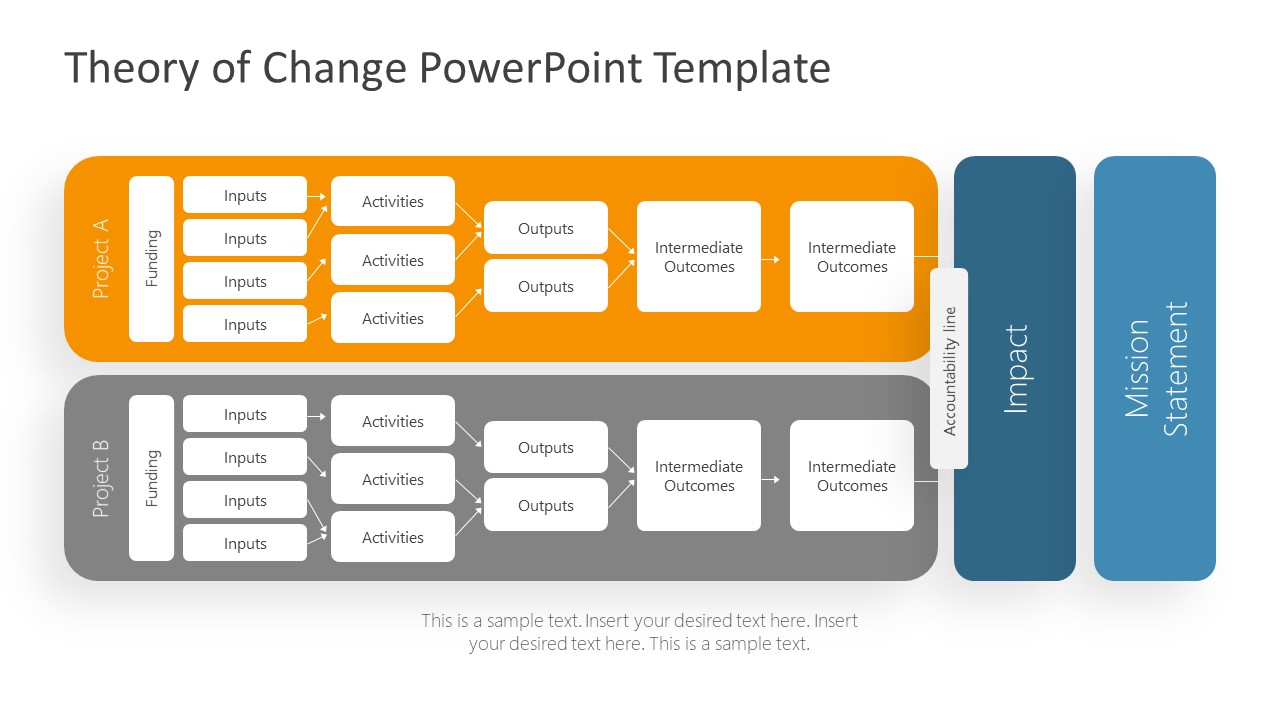
The Theory of Change PowerPoint Template is a flowchart diagram design used as a guiding framework for impact strategy. Non-profits, social enterprises, accelerators, and impact funds can benefit from two project slides for the theory of change. Each project presents a process flow from funding to the impact of change in five phases. It template will help create a comparison and impact analysis in PowerPoint. In this way, users can display two strategies to achieve the same impact and support decision making. The theory of change is the most accepted framework to document impact measurement and management strategy. The theory of change is the foundation of any mission-driven initiative to solve the world’s social and environmental issues.
ToC or theory of change not only documents the steps involved in achieving impact. It also ensures that activities and resources align with the mission statement before starting the initiative. The ToC framework diagram enables professionals to develop an actionable impact strategy. All operational decisions about change and its effectiveness are made through impact strategy. Such as data collection, assessment, analysis, and further improvements that need to be made.
The PowerPoint templates of the theory of change provide a basic framework, addressing major components of strategic planning. This presentation template displays these components in five phases input, activities, outputs, outcomes, and impact. The inputs refer to resources or investments needed to ensure the activities’ performance. In the Activity phase, the organization answers questions like what activities to perform for desired output. For example, in skill development social enterprise, high-quality training is an activity that produces skill output. The outputs are immediate results of activities that are necessary to achieve social impact outcomes. Whereas, outcomes refer to changes brought by the initiative i.e. increase job placements due to skill training. Finally, impact is the result of one or more outcomes that reflects on the nonprofit’s mission statement. Alternatively, the user can download other strategy PowerPoint templates.
The Theory of Change PowerPoint Template contains two slides for the framework with different color themes. An editable PowerPoint diagram for theory of change where presenter can easily customize text and colors as required. The theory of change template will help professionals to communicate impact measures or management strategies. Alternatively you can download other theory of change slide templates compatible with PowerPoint and Google Slides.
What’s inside this template
Example presentation scenarios
- A nonprofit executive can present a board strategy update by comparing Project A and Project B in the two-lane flowchart and showing how funding leads to inputs, activities, outputs, outcomes, and impact.
- A social enterprise founder can explain an accelerator pitch by using the activities, outputs, and intermediate outcomes boxes to connect daily operations with the final impact and mission statement.
- An impact fund analyst can review two grant options by mapping each option across the project lanes and using the accountability line to discuss responsibility before the impact column.
- A change management consultant can align partners around a shared program logic by replacing the input, activity, and outcome text with the client initiative's operating assumptions.
Features
- 100% editable presentation template
- Compatible with Microsoft PowerPoint and Google Slides
- 16:9 aspect ratio slides
- Scalable vector shapes, icons and illustrations
- AI-Ready for Microsoft Copilot and Claude
- Instant access and download
Frequently asked questions
Q: How should a presenter explain the theory of change without overloading the audience?
A: Start at the left with funding and inputs, then move one phase at a time through activities, outputs, and intermediate outcomes. Treat the impact and mission statement columns as the conclusion, not as extra details. If comparing Project A and Project B, call out only the differences that change the logic of the pathway.
Q: Who is this template best suited for?
A: This template fits mission-driven presenters who must show how an initiative creates change before execution or funding approval. Nonprofit leaders, social enterprises, accelerators, and impact funds can use the two project lanes to compare alternative strategies and make the assumptions behind each pathway visible to decision makers.
Q: Why does the flowchart use two horizontal project lanes ending in impact and mission statement blocks?
A: The horizontal lanes make causality easy to follow from resources to change, while the final blue columns separate impact from the mission statement. This visual metaphor frames each project as a path toward the same strategic destination, helping audiences compare logic, accountability, and expected outcomes without needing a dense narrative slide.


Theory of Change PowerPoint Template
2-slide presentation template for theory of change flowcharts and impact strategy mapping
The Theory of Change PowerPoint Template is a 2-slide strategy presentation template for mapping mission-driven initiatives from funding and inputs to activities, outputs, outcomes, impact, and mission statement. It includes two color treatments of the same horizontal flowchart for nonprofits, social enterprises, accelerators, and impact funds in Microsoft PowerPoint and Google Slides.
- Category
- Strategy
- Rating

 Loading...
- Aspect ratio
- 16:9
- Item ID
- 20709-01
- Colors
 Microsoft PowerPoint
 Microsoft Copilot
 Claude for PowerPoint
Other formats supported
Subscribe today and get immediate
access to download our PowerPoint templates.