Slide 7 of 13 from Stratum Business PowerPoint Template
Competitive Positioning Slide – Stratum PowerPoint Template
Competitive Positioning Slide for Business Analysis
- Diagram
- Matrix Quadrant
- Strategic Analysis Slide
- 16:9
- 100% Editable
The Competitive Positioning Matrix slide from the Stratum Business PowerPoint Template provides a clear 2x2 matrix layout ideal for strategic analysis in business presentations. This slide template helps visualize market positioning by capability and focus, making it suitable for competitive landscape reviews and market analysis. It includes editable shapes and placeholders for detailed insights, supporting effective communication in pitch decks or corporate presentations.
What’s on This Slide
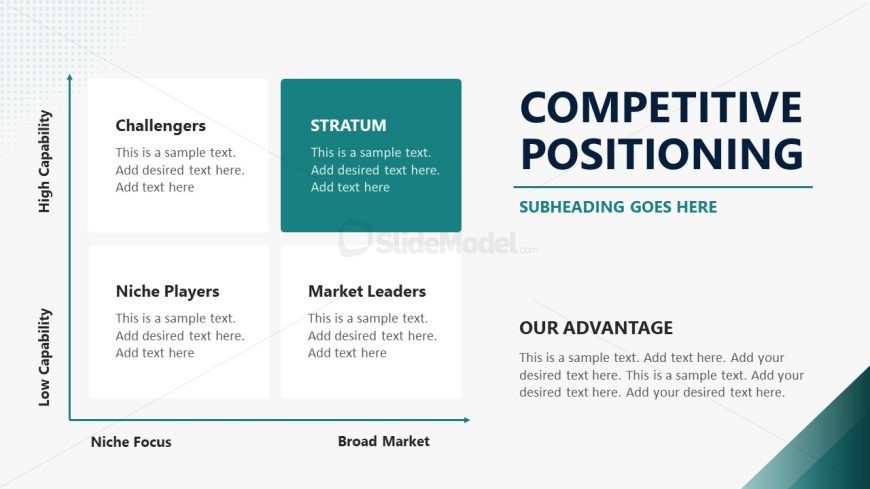
The layout features a 2x2 matrix with four quadrants labeled 'Challengers', 'Niche Players', 'Market Leaders', and a central box titled 'STRATUM'. The vertical axis indicates 'High Capability' at the top and 'Low Capability' at the bottom, while the horizontal axis shows 'Niche Focus' on the left and 'Broad Market' on the right. Each quadrant contains text placeholders for additional information. The slide includes a title at the top right, a subheading below it, and a section labeled 'OUR ADVANTAGE' at the bottom. The overall color scheme includes teal and dark blue accents.
How to Use It
This layout serves as a competitive positioning matrix, ideal for illustrating market placement based on capability and focus. It fits well in a business presentation to analyze competitors or market segments. Use this slide when discussing strategic positioning, market analysis, or competitive advantages. It can be particularly useful in scenarios like product launches, strategic planning sessions, or investor presentations to clarify market dynamics.
Text Placeholders & Capacity
Keep your copy within these limits so it fits without resizing. Node body slots can hold roughly 15-20 words each.
| Placeholder | Count | Max characters (approx.) |
|---|---|---|
| Slide title | 1 | 30 |
| Subtitle | 1 | 50 |
| Item heading | 4 | 20 |
| Item body | 4 | 100 |
| Callout | 1 | 60 |
Slide Keywords
Download unlimited PowerPoint templates, charts and graphics for your presentations with our annual plan.
DOWNLOADReturn to Stratum Business PowerPoint Template.