Slide 6 of 6 from Scrum Framework Diagrams for PowerPoint
6164-01-scrum-framework-6
Sprint Cycle Overview for Scrum Framework
- Diagram
- Matrix Grid
- Process Slide
- 16:9
- 100% Editable
The Sprint Cycle Overview slide from the Scrum Framework Diagrams for PowerPoint template visually outlines key Agile sprint processes, including daily scrums and review sessions. This slide layout is ideal for business presentations and pitch decks aiming to educate teams on Scrum roles and track project progress using editable shapes and vector icons within professional slide templates.
What’s on This Slide
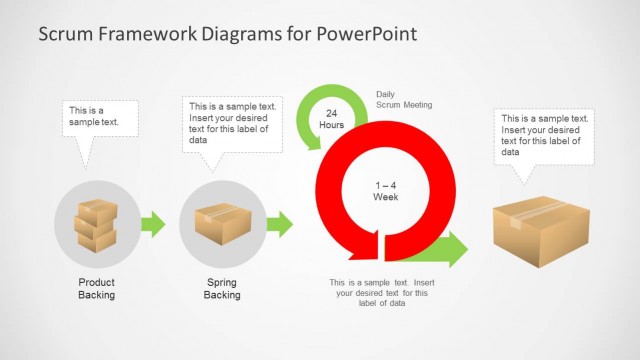
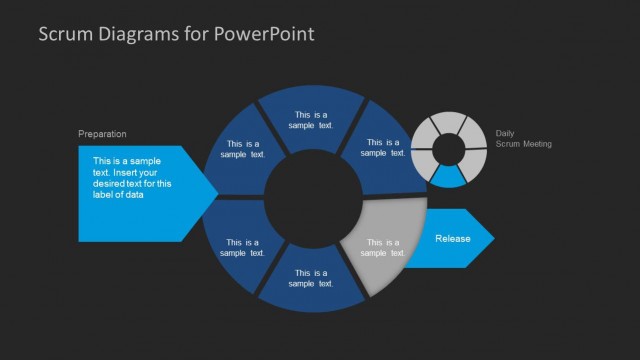
The layout features three horizontal sections, each representing a sprint cycle. On the left, there are red labels for 'Sprint 1', 'Sprint 2', and 'Sprint 3'. Each section contains a circular green icon labeled 'Daily Scrum' at the center, flanked by two rectangular placeholders for 'Backing' and 'Review' on the left and right, respectively. The placeholders are aligned vertically and contain sample text prompts. The background is dark, enhancing the visibility of the elements. The overall composition is structured to facilitate understanding of the sprint process.
How to Use It
This layout serves as a visual representation of the sprint cycle in Agile project management. It fits within a presentation discussing Scrum methodologies, particularly after explaining the backlog process. This format is useful for teams to visualize their sprint activities, including daily scrums and review sessions. It can be applied in meetings to track progress or in training sessions to educate new team members about the Scrum framework.
Text Placeholders & Capacity
Keep your copy within these limits so it fits without resizing. Node body slots can hold roughly 10 words each.
| Placeholder | Count | Max characters (approx.) |
|---|---|---|
| Item heading | 3 | 30 |
| Item body | 6 | 50 |
| Chart title | 1 | 30 |
Slide Keywords
Download unlimited PowerPoint templates, charts and graphics for your presentations with our annual plan.
DOWNLOADReturn to Scrum Framework Diagrams for PowerPoint.