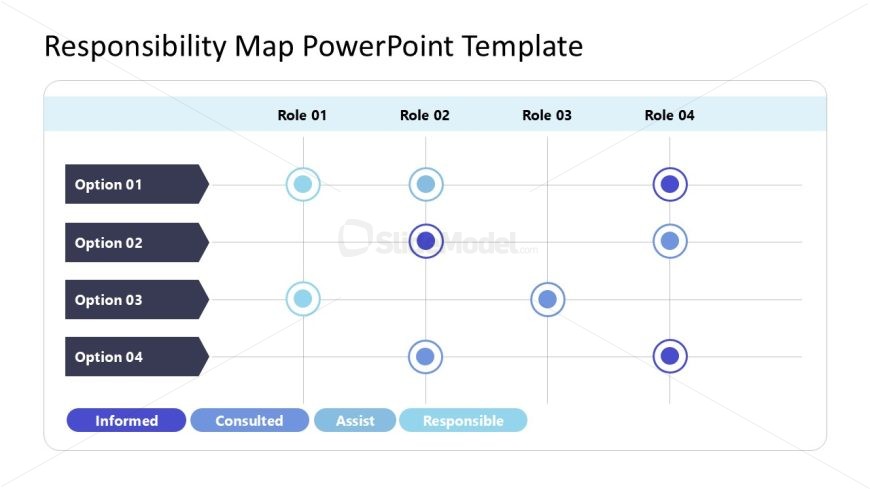
Slide 1 of 2 from Responsibility Map PowerPoint Template
Editable Responsibility Map PPT Template
Responsibility Assignment Matrix Slide
- Table
- Responsibility Assignment Matrix
- Strategic Analysis Slide
- 16:9
- 100% Editable
What’s on This Slide
The layout features a grid structure with four rows and four columns. The first column contains labels for options, while the subsequent columns represent different roles. Each row has a corresponding label aligned to the left. Circular nodes are positioned within the grid cells, indicating various responsibilities. Color-coded labels at the bottom define the roles of 'Informed,' 'Consulted,' 'Assist,' and 'Responsible.' Text placeholders exist for the title and option labels, positioned at the top and left, respectively. The overall composition is organized and clear.
How to Use It
This layout serves as a responsibility assignment matrix, illustrating roles and responsibilities for project management. It fits well in presentations focusing on team roles, project planning, or accountability frameworks. This structure is useful for clarifying who is responsible for specific tasks within a project. It can be applied in business meetings, project kick-offs, or team alignment sessions to ensure clarity in responsibilities and expectations.
Text Placeholders & Capacity
Keep your copy within these limits so it fits without resizing. Node labels can accommodate roughly 2-3 words each.
| Placeholder | Count | Max characters (approx.) |
|---|---|---|
| Slide title | 1 | 30 |
| Item heading | 4 | 15 |
| Item body | 16 | 10 |
| Callout | 4 | 15 |
Slide Keywords
Download unlimited PowerPoint templates, charts and graphics for your presentations with our annual plan.
DOWNLOADReturn to Responsibility Map PowerPoint Template.