Slide 8 of 10 from Professional Report PowerPoint Template
General Targets Presentation – Professional Report Deck
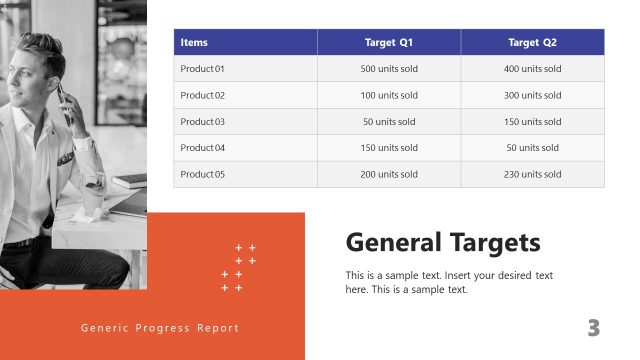
General Targets Table for Business Reporting
- Table
- Data Table
- Evaluation Slide
- 16:9
- 100% Editable
The General Targets Table slide from the Professional Report PowerPoint Template offers a clear layout for tracking sales targets across quarters. This editable slide features a structured table ideal for business presentations, enabling teams to evaluate quarterly performance and progress effectively within a corporate presentation or pitch deck template.
What’s on This Slide
The layout features a table positioned centrally, with a bold title at the top. The table has three columns labeled 'Items', 'Target Q1', 'Target Q2', and 'Target Q3', with a blue background for the headers. Each row contains product names and their corresponding sales targets for three quarters. Checkmarks and crosses indicate target achievement. Text placeholders are present at the bottom for additional notes. The overall composition is structured for clarity, with a clean design emphasizing the data.
How to Use It
This layout serves as a data presentation table, ideal for reporting sales targets across multiple periods. It fits within a business report sequence, typically following sections on strategy or performance analysis. This format is useful for sales teams to track progress and set future goals. It can be used in meetings or presentations where clear target visibility is essential for decision-making and accountability.
Text Placeholders & Capacity
Keep your copy within these limits so it fits without resizing. Node labels can hold up to 20 characters each.
| Placeholder | Count | Max characters (approx.) |
|---|---|---|
| Slide title | 1 | 30 |
| Item heading | 5 | 20 |
| Item body | 15 | 25 |
| Body paragraph | 1 | 150 |
Slide Keywords
Download unlimited PowerPoint templates, charts and graphics for your presentations with our annual plan.
DOWNLOADReturn to Professional Report PowerPoint Template.