Slide 2 of 7 from Plans & Pricing Template for PowerPoint
6079-02-plans-pricing-template-powerpoint-2
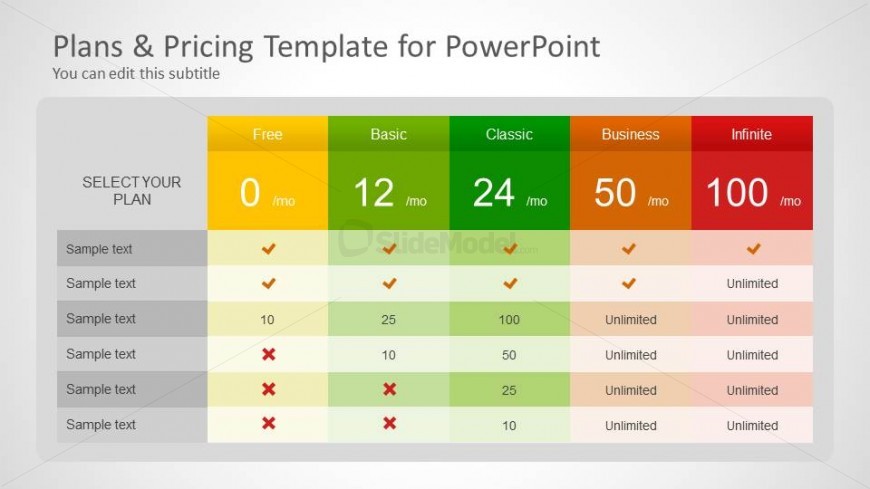
Pricing Comparison Table for Plans & Pricing
- Table
- Pricing Table
- Evaluation Slide
- 16:9
- 100% Editable
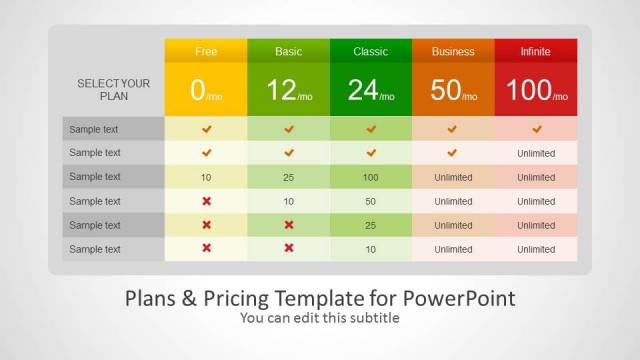
The Pricing Comparison Table slide from the Plans & Pricing Template for PowerPoint offers a clear layout for subscription plans and service tiers. This slide template includes editable shapes and a structured table design that highlights pricing and feature availability, making it suitable for business presentations and pitch deck templates focused on pricing strategies.
What’s on This Slide
The layout features a pricing comparison table with five columns labeled Free, Basic, Classic, Business, and Infinite. Each column contains monthly pricing details and checkmarks or crosses indicating feature availability. The first row serves as a header, while the leftmost column lists features with sample text placeholders for descriptions. The table is structured with alternating row colors for clarity. Text placeholders are aligned centrally within their respective cells, and the overall design uses a light background with a subtle gradient. The visual hierarchy emphasizes the pricing options through color differentiation.
How to Use It
This layout functions as a pricing comparison table, ideal for presenting subscription plans or service tiers. It fits within a presentation sequence that discusses product offerings or pricing strategies. This structure is useful for businesses, especially SaaS companies, to clearly communicate pricing options and feature availability. It can be employed in marketing materials, sales presentations, or product launch events to facilitate decision-making for potential customers.
Text Placeholders & Capacity
Keep your copy within these limits so it fits without resizing. Cell slots are compact, roughly 10 characters each.
| Placeholder | Count | Max characters (approx.) |
|---|---|---|
| Column header | 5 | 10 |
| Row label | 6 | 15 |
| Cell | 30 | 10 |
| Body paragraph | 1 | 50 |
Slide Keywords
Download unlimited PowerPoint templates, charts and graphics for your presentations with our annual plan.
DOWNLOADReturn to Plans & Pricing Template for PowerPoint.