Slide 11 of 13 from Orbit Product PowerPoint Presentation Template
Go-to-Market Strategy PPT Slide – Orbit Product Presentation Template
Go-To-Market Strategy Slide Overview
- Diagram
- Other
- Strategy Slide
- 16:9
- 100% Editable
The Go-To-Market Strategy Slide from the Orbit Product PowerPoint Presentation Template offers a clear, three-phase layout ideal for outlining product launch plans and marketing strategies. This slide template includes editable sections for phase details and key performance indicators, making it a practical choice for business presentations and pitch decks that require structured strategic overviews.
What’s on This Slide
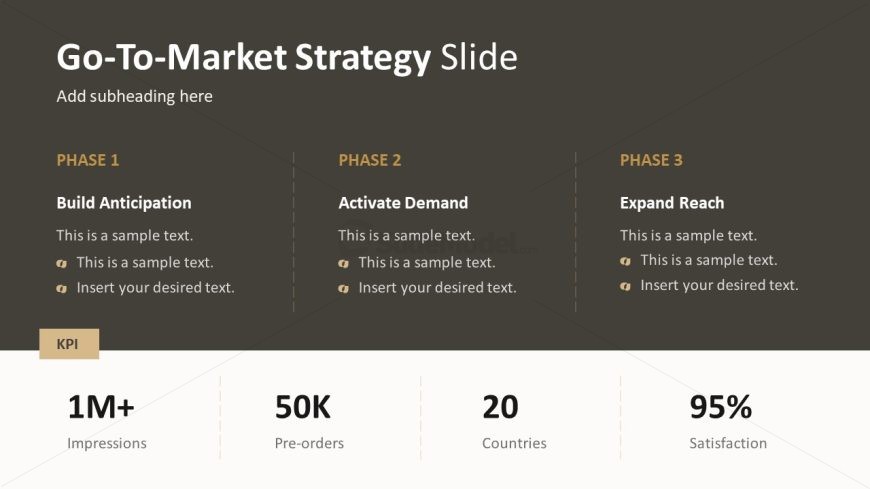
The layout features three vertical sections aligned side by side, each labeled as a phase. The first section is titled 'PHASE 1' and contains a header, followed by two lines of sample text. The second section, 'PHASE 2', mirrors the first with its own header and text placeholders. The third section, 'PHASE 3', also follows this structure. At the bottom, a KPI section spans the width, containing four metrics: Impressions, Pre-orders, Countries, and Satisfaction, each with corresponding values. Text placeholders are centered within their respective sections.
How to Use It
This layout serves as a multi-phase strategy overview, ideal for detailing a go-to-market plan. It fits within a presentation sequence after problem framing and before product ecosystem discussions. This format is useful for product teams to outline strategic phases, showcasing key performance indicators to stakeholders. It can be applied in business contexts such as product launches, marketing strategies, or project planning where clear phase delineation is necessary.
Text Placeholders & Capacity
Keep your copy within these limits so it fits without resizing. Node body slots can accommodate roughly 10-15 words each.
| Placeholder | Count | Max characters (approx.) |
|---|---|---|
| Slide title | 1 | 30 |
| Subtitle | 1 | 30 |
| Item heading | 3 | 20 |
| Item body | 6 | 50 |
| Kpi value | 4 | 10 |
Slide Keywords
Download unlimited PowerPoint templates, charts and graphics for your presentations with our annual plan.
DOWNLOAD