Customize our ITSM Help Desk Process PowerPoint Template to discuss your strategic vision and plan for developing a successful ITSM system. ITSM is a broader term for comprehensive support for end-to-end software product delivery. It includes support services and activities such as creating, designing, training, and managing change-associated problems. This ITSM PowerPoint template features a schematic diagram showing the strategic working model of the ITSM help desk process created by the directions of ITIL. Professionals can use this presentation template for discussing their strategy with shareholders and clients. Further, it can help elaborate the requirements before the development team to guide them about creating assistance software. All components included in the slides are 100% editable. So, users can easily make any changes to fit their use case.
The first slide of this ITSM Help Desk Process PowerPoint Template shows a segmented process diagram indicating the major components of the ITSM help desk process. The slide is divided into two sections. The rectangular part represents the major roles (the help desk organization), equipment & communication networks involved (enablers), and the senior board of executives (service review board). It is connected through arrow heads to the right of the slide that mentions the mission statement, service offer, sponsor, feedback, performance, and terminates on the business or end customers. Presenters can discuss this IT Service Management model and edit the provided text with PowerPoint, Google Slides, and Keynote.
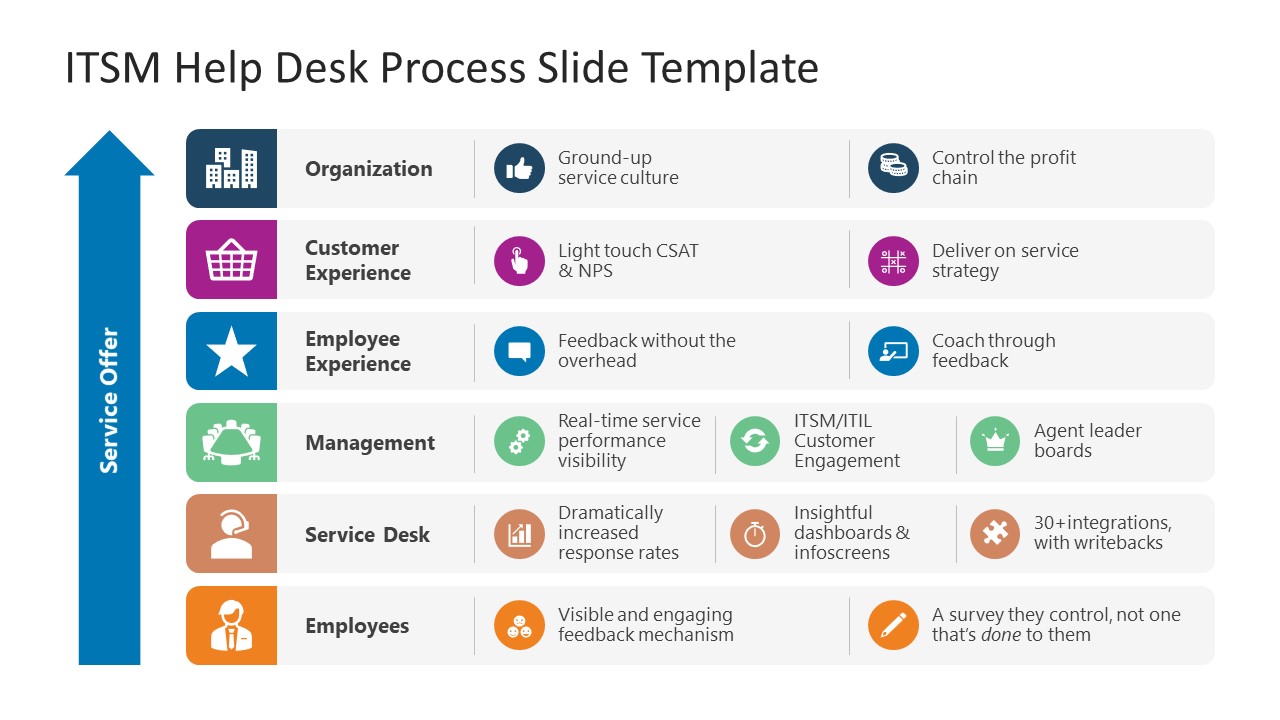
The second slide displays an arrow diagram displaying the service offer and its increasing priority. The infographic icons represent how the service offers increased from employees up to the organization. Certain services are also mentioned alongside the icons. Users can edit the icons and their captions or change the colors. Grab this PPT template and use it in your business presentations!
What’s inside this template
Example presentation scenarios
- An IT service manager can present the helpdesk model diagram to executives to show how organization levels, enablers, the service review board, and customer feedback connect in the operating model.
- A customer support director can use the service offer priority diagram to explain which service areas affect organization outcomes, customer experience, employee experience, management visibility, and service desk execution.
- A software product owner can use the slide 1 process model to brief developers on required help desk workflows, reporting points, and business customer touchpoints before building support tooling.
- A consultant can use both diagrams in an ITIL workshop to align stakeholders on service governance, feedback loops, and the priority of support offers across internal and external audiences.
Features
- 100% editable presentation template
- Compatible with Microsoft PowerPoint and Google Slides
- 16:9 aspect ratio slides
- Scalable vector shapes, icons and illustrations
- AI-Ready for Microsoft Copilot and Claude
- Instant access and download
Frequently asked questions
Q: How should a presenter explain the ITSM help desk model without making the process feel too abstract?
A: Start with the business/customer bar on the right, then move left to show how feedback, market needs, and sponsorship influence the service offer. After that, explain the internal blocks: helpdesk organization, service review board, and enablers. This order ties the operating model to service outcomes before discussing internal structure.
Q: Who is this template best suited for in an ITSM discussion?
A: It fits IT service managers, support operations leaders, and consultants who need to align business stakeholders around a support model. The first slide explains governance and infrastructure, while the second slide helps compare service priorities across organization, customer experience, employee experience, management, service desk, and employees.
Q: Why does the template use arrows and horizontal service rows instead of a simple bullet list?
A: The arrow metaphor on the service offer slide makes priority and progression easier to read, while the row structure separates audiences and service themes. The helpdesk model diagram uses directional arrows to show inputs, feedback, and governance relationships, which helps viewers see the system rather than memorize isolated points.



ITSM Help Desk Process PowerPoint Template
2-slide ITSM help desk process presentation template with service offer and support model diagrams
This is a 2-slide ITSM help desk process template for explaining service management structure and support priorities. It includes an IT helpdesk model diagram, continuous improvement frame, service review board, enablers block, and service offer priority map. Designed for IT, support, and operations teams in Microsoft PowerPoint and Google Slides.
- Category
- Process Diagrams
- Rating

 Loading...
- Aspect ratio
- 16:9
- Item ID
- 21683-01
- Colors
 Microsoft PowerPoint
 Microsoft Copilot
 Claude for PowerPoint
Other formats supported
Subscribe today and get immediate
access to download our PowerPoint templates.